
DARTA DIGITAL AUDIO · GUITAR SYNTHESIZER
Starforge
A synthesizer you play with your guitar. No special pickup, no MIDI, no keyboard: plug in, play a note and it becomes a synth bass, a lead, a pad or an 80s arpeggio, following your picking, your bends and your vibrato.
Charged in Brazilian Reais (BRL), converted from US$ 49 at the day’s exchange rate. PayPal or your card converts it back and shows the exact amount in your currency before you confirm. Download link and license key by e-mail right after payment. Windows and Mac.
Not a filter pedal. A real synthesizer.
Most "guitar synth" pedals take your guitar signal and run it through a filter or an octaver. Starforge does something else: it figures out which note you are playing and generates a brand new sound, from scratch, on that note. That's why a saw wave sounds like a real saw wave, and a pad sounds like a pad.
It hears the note
Every 2.7 milliseconds Starforge analyzes your signal and finds the note, its exact tuning and how hard you picked it.
A synth plays that note
Two oscillators, sub, noise, ladder filter, envelopes, LFO, arpeggiator and six effects. The sound is created right there. It is not your guitar filtered.
Your hands stay in charge
Pick harder and the sound opens up. Bends, vibrato, slides, hammer-ons and pull-offs reach the synth exactly as you played them.
From your fingers to the speaker
The path the sound takes inside the plugin. Knowing it makes creating your own tones much easier.
You play
One note at a time, on the guitar you already own. Regular pickups, nothing special.
Note detector
Finds the note, the tuning in cents, the picking strength and whether you moved to the note legato (hammer-on, slide).
Oscillators
Generate the sound: two waveforms, a sub oscillator, noise and the "guitar" oscillator, which is your own string turned into a square wave.
Filter and envelopes
The filter shapes the tone (dark, bright, nasal). The envelopes decide how the sound starts, holds and fades.
Modulation
LFO, step modulator and arpeggiator make the sound move on its own: vibrato, rhythmic filters, sequences.
Effects and output
Fuzz, EQ, chorus, phaser, delay and reverb. In parallel, a MIDI output with everything you played.
Tour the panel
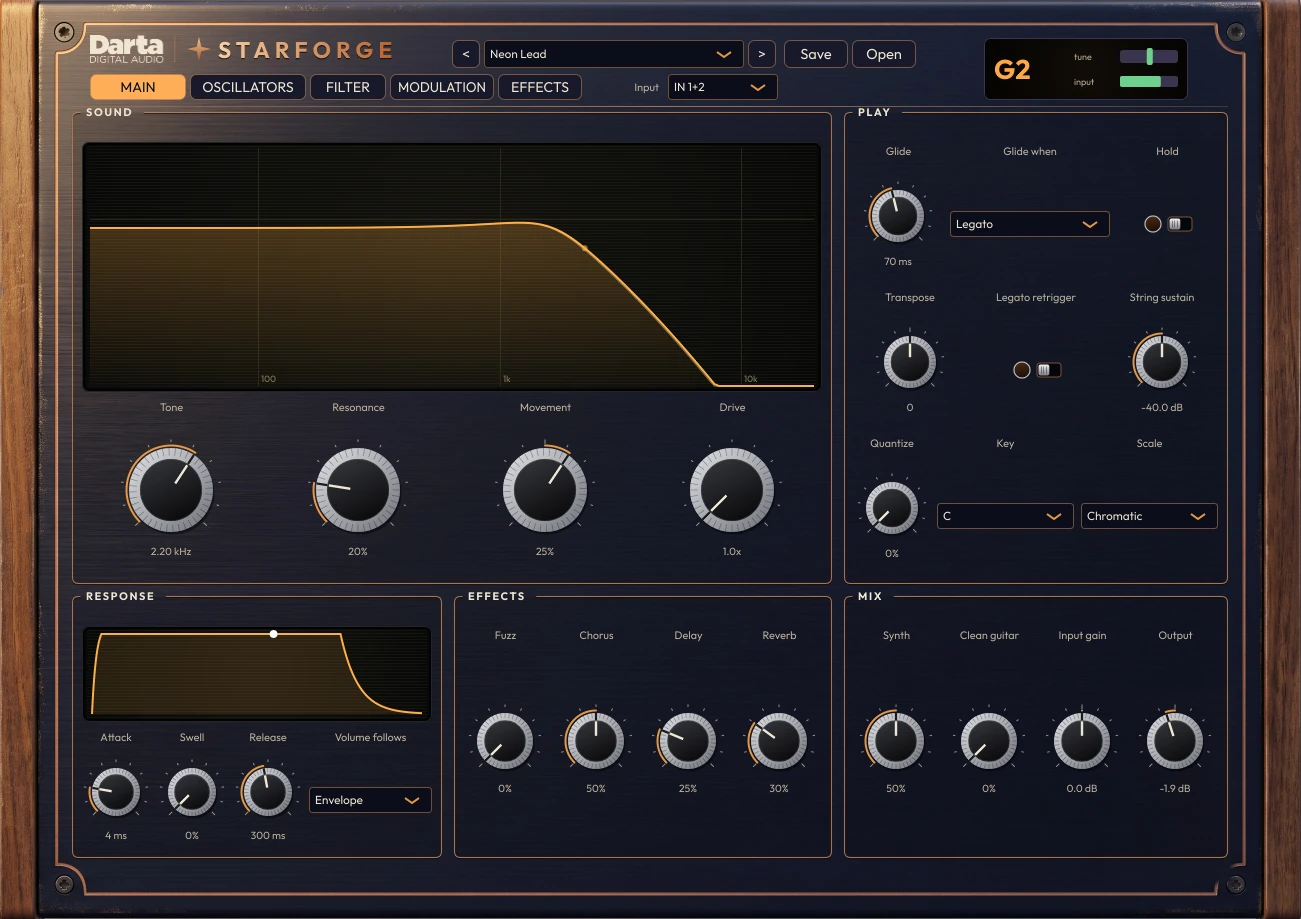
Five tabs. The first one has everything you need to play; the others are for when you want to go deep into the sound.
Everything you need to play
You could spend your whole life on this tab: pick a preset, adjust the tone and play.
Sound
Tone is the brightness (the filter cutoff). Resonance emphasizes the cutoff point, that classic “wow”. Movement is how much the filter opens on each pick stroke. Drive saturates the filter.
Play
Glide makes each note slide into the next. Hold freezes the current note (great for drones). Transpose shifts the octave or key. String sustain sets how long the note lasts while the string dies down.
Quantize
Pulls the pitch toward the notes of the scale chosen in Key and Scale. At 0 your bends stay free; at 100% every note lands right on the scale.
Response
Attack and Release are the start and end of each note. Swell slows the attack when you pick softly, like a volume pedal. Volume follows chooses whether the volume follows the synth envelope or your string.
Effects and Mix
Quick knobs for the amount of fuzz, chorus, delay and reverb. In Mix you balance the synth against the clean guitar and set input gain and output.
Tempo and TAP (standalone app)
In the standalone app, with no DAW, a Tempo control (40 to 240 BPM) and a TAP button appear at the top of the panel: tap the button along with the music and it sets the tempo. The arpeggiator, LFO, steps and delay follow it. Inside a DAW, Starforge follows the project tempo.
Where the sound comes from
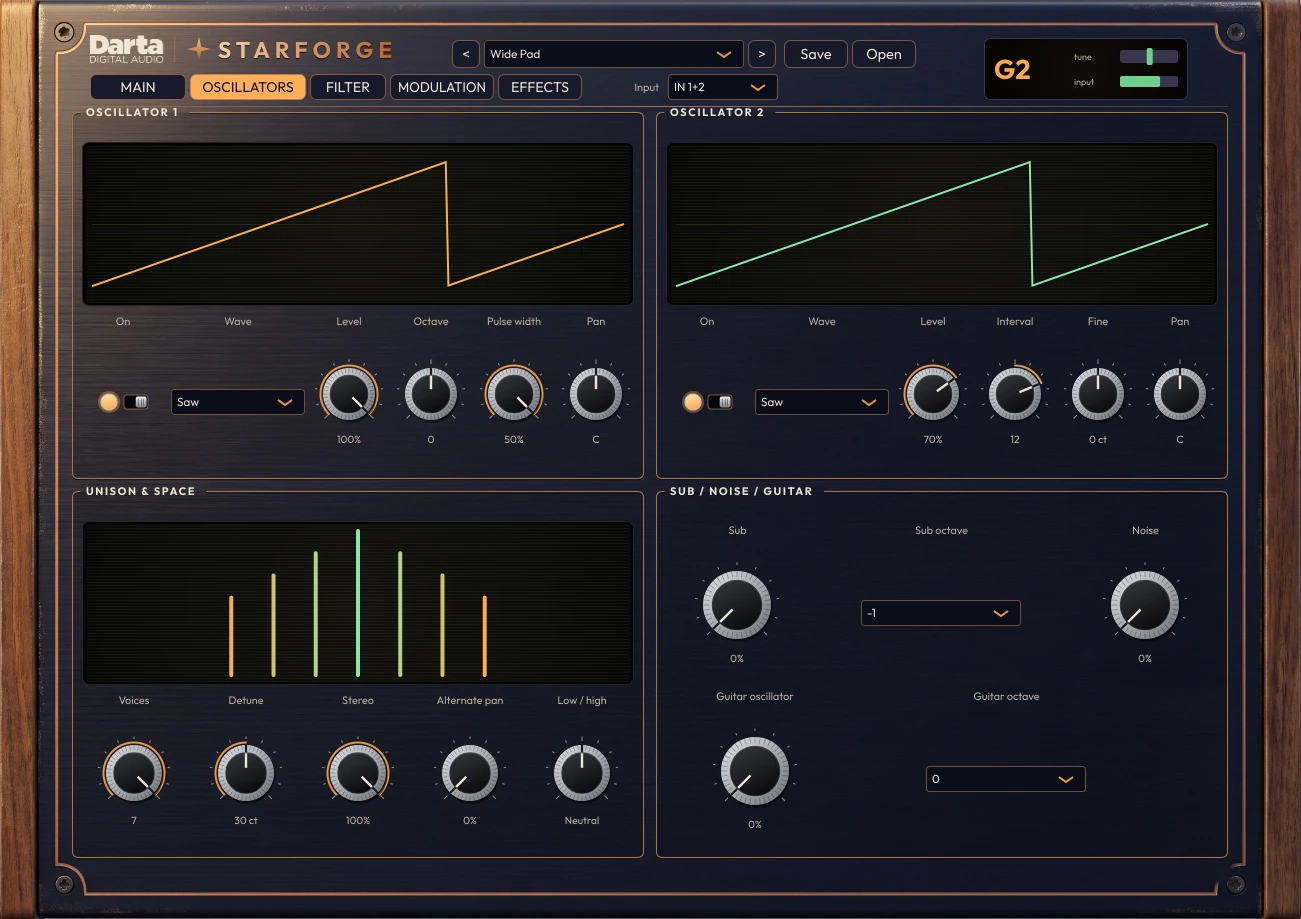
This is where the tone is born. Each oscillator generates a waveform, and each waveform has its own character.
Waveforms
Saw: rich and bright, the base of brass, strings and leads. Square: hollow, clarinet-like, video game. Triangle: soft. Sine: pure, almost a whistle.
Oscillator 2
Can sit an octave up, a fifth up (Interval) or slightly detuned (Fine), which fattens the sound. Pulse width changes the tone of the square wave.
Unison and space
Up to 7 slightly detuned copies of the sound (Voices and Detune), spread across the stereo field. Alternate pan sends each new note to a different side. Low / high balances lows and highs along the neck.
Sub, noise and guitar
Sub adds a wave one or two octaves below. Noise adds breath and air. The Guitar oscillator turns your own string into a square wave with zero delay, and can drop an octave: a built-in octave fuzz.
The tone sculptor
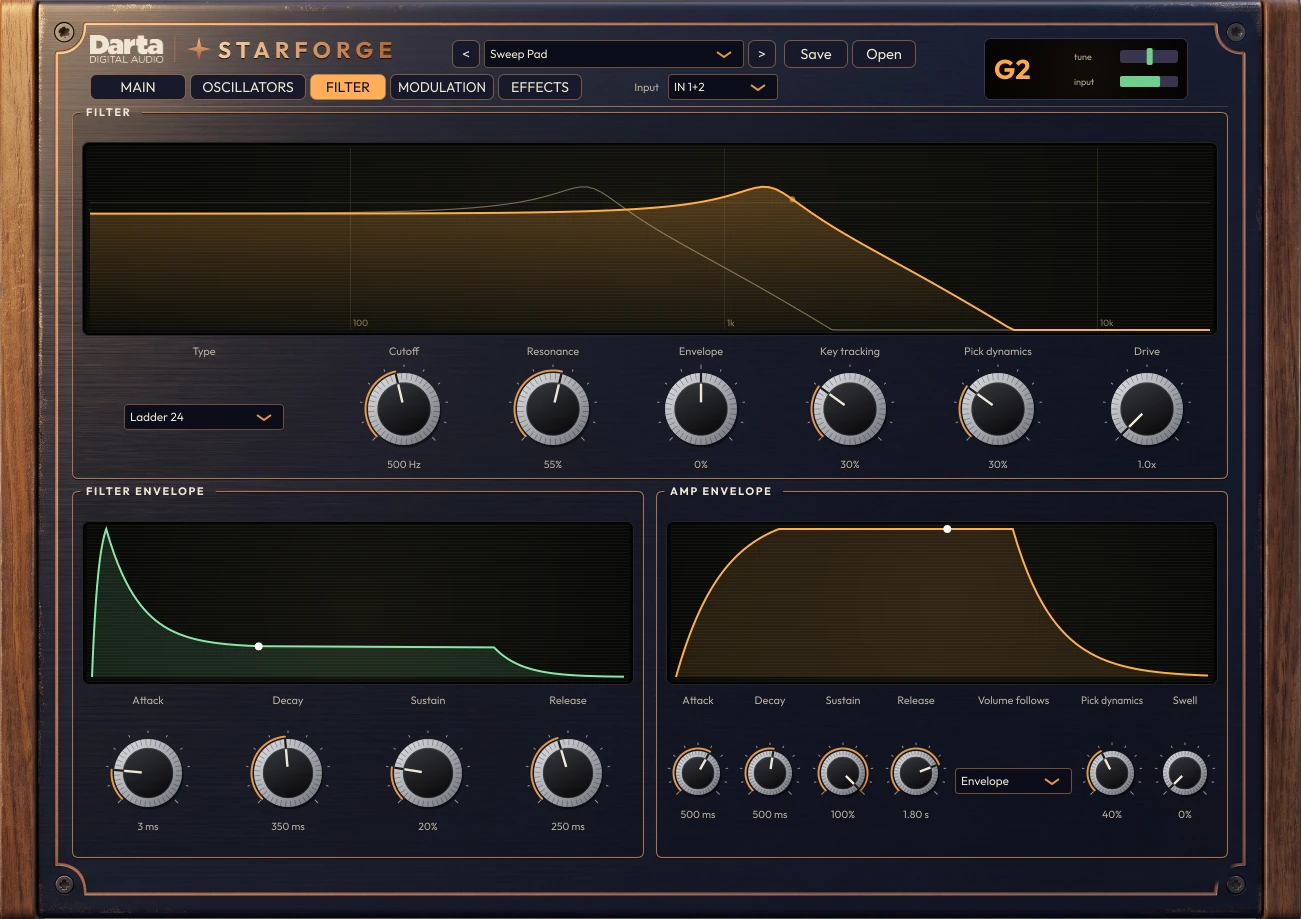
The filter removes frequencies from the sound. It's the control that changes a synth's character the most.
Types
Ladder 24: the classic filter, fat and creamy. LP 12: gentler. BP: nasal, almost vocal. HP: removes the lows, thin sound. Notch: cuts a hole in the middle, like a frozen phaser.
Cutoff and resonance
Cutoff is where the filter cuts. Resonance adds a peak at that point; turned up, it almost sings.
Envelope, note and picking
Envelope opens and closes the filter on every note (positive opens, negative closes). Key tracking opens it more on higher notes. Pick dynamics: the harder you pick, the more the filter opens.
ADSR
Both envelopes have four stages: Attack (time to reach the peak), Decay (time to fall), Sustain (the level while the note lasts) and Release (time to fade after the note ends).
Sound that moves on its own
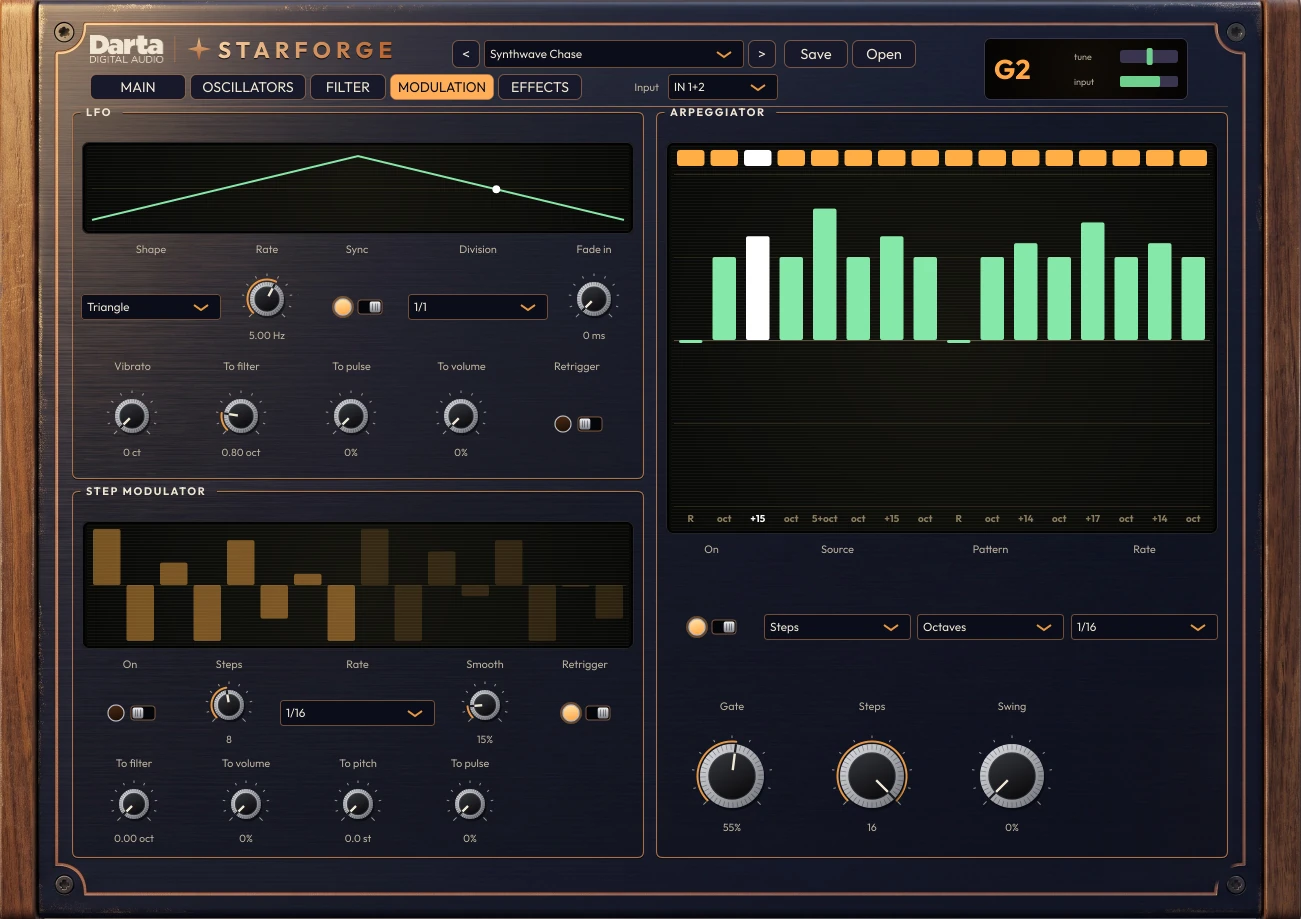
Three tools that bring the sound to life without you touching anything: the LFO, the step modulator and the arpeggiator.
LFO
A slow wave that moves something: the pitch (Vibrato), the filter, the pulse width or the volume (tremolo). It can follow the DAW tempo (Sync) and fade in gradually (Fade in).
Step modulator
Draw up to 16 steps with your mouse and it plays that shape in time, moving the filter, volume, pitch or pulse width. Smooth turns steps into curves. It’s what drives Stutter Gate and Rhythmic Filter.
Arpeggiator
Hold a note and it plays a sequence starting from it. Change the note and the sequence follows. Use one of the 8 ready-made Patterns, or Steps to program up to 16 steps.
Programming steps
Drag each bar up or down to pick the interval (octave, fifth…). Click the top row to mute a step. Double-click resets it. Gate is the length of each note; Swing adds groove.
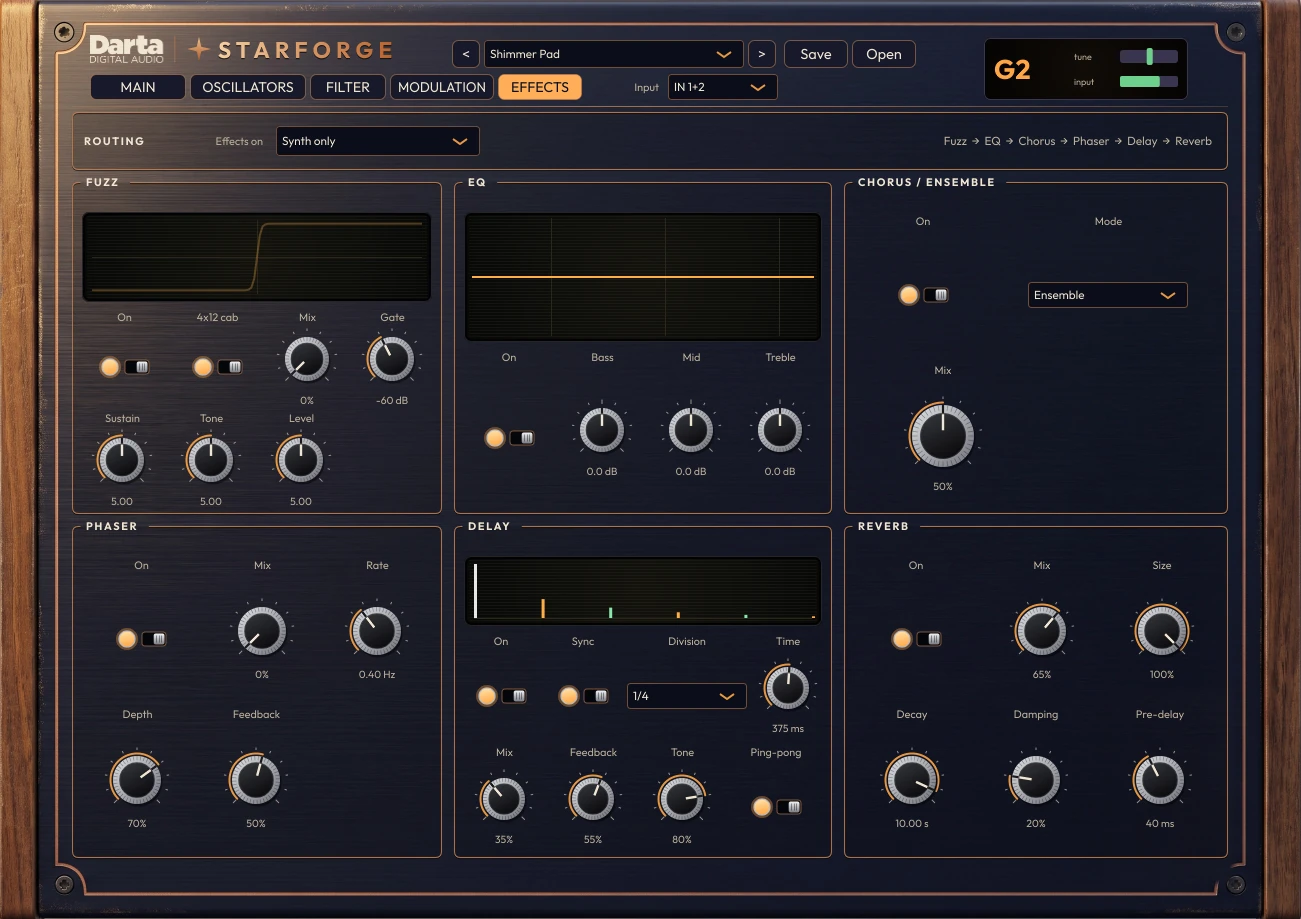
The synth's pedalboard
Six effects in series, in the order shown at the top of the tab.
Routing
Choose whether the effects apply to the synth only or to the clean guitar too (Synth + guitar).
Fuzz
A long-sustain fuzz with scooped mids, a 4×12 cabinet simulation and a Gate that cuts the hiss when you stop playing.
EQ, chorus and phaser
Three-band EQ. Chorus with modes I, II, I+II and Ensemble, the last one made for pads and strings. Phaser with rate, depth and feedback.
Delay and reverb
Tempo-synced delay with ping-pong and tone control for the repeats. Reverb with size, decay, damping and pre-delay.
Getting the most out of it
Playing a synth through a guitar is a little different from playing guitar. These tips make a big difference.
One note at a time
Starforge is monophonic: it plays one note at a time, like a lead synth. Mute the previous note before the next one and it retriggers cleanly.
Guitar straight into the plugin
Plug the guitar straight into your interface, without distortion, chorus or delay before it. A tuner or a light compressor won’t hurt.
Neck pickup
The neck pickup with the tone knob open gives the clearest note, and the detector gets even more solid.
Set the input gain
In the corner display, the input bar should stay green on hard pick strokes. If it turns red, lower Input gain.
Tune your guitar well
A synth makes any tuning issue obvious. The tune display shows the cents of the note you’re playing. Quantize takes care of the rest.
Low notes take a moment
A low string has to vibrate a few times before the note can be recognized. For fast bass lines, play higher up the neck and use Transpose or the oscillator octave to go down.
Blend with the guitar
The Clean guitar knob adds your original guitar to the synth. A quiet pad behind a clean guitar is a beautiful sound.
Record the MIDI too
Starforge sends MIDI with everything you played, bends included. Record it on a MIDI track and use your guitar to play any other instrument in your DAW.
54 presets to get started
Grouped by type of sound, all level-matched, so switching presets never catches you off guard. You can save your own, too.
Bass · 8
Lead · 9
Pad · 11
Keys · 2
Arp · 18
FX · 5
Try before you buy
Download the trial with everything unlocked: oscillators, filter, modulation, arpeggiator and effects. The only difference is that the sound drops out for 3 seconds every 45 seconds and presets can’t be saved. Like it? Buy a license and paste the key into the plugin, no reinstall needed.
Windows 10 and 11 (VST3 and standalone) and macOS 10.15 or newer (AU, VST3 and standalone).
Specifications
System
Windows 10 or 11, 64-bit. macOS 10.15 or newer (Intel and Apple Silicon).
Formats
Windows: VST3 and standalone application. Mac: AU, VST3 and standalone application.
Detection
Monophonic, from 50 Hz to 1.4 kHz: 6 and 7-string guitars and low tunings.
MIDI
MIDI output with notes and pitch bend.
Synthesis
2 oscillators with up to 7-voice unison, sub, noise, guitar oscillator, 5 filter types, 2 envelopes.
Modulation
LFO, 16-step modulator and arpeggiator with 8 patterns or 16 programmable steps.
Effects
Fuzz with cabinet and gate, EQ, chorus, phaser, delay and reverb.
License
One license key activates up to 2 computers. Once activated, it works offline. 54 factory presets, plus your own.
FAQ
Do I need a MIDI or hexaphonic pickup?
No. Any guitar with regular pickups works, plugged into an audio interface.
Does it play chords?
No. Starforge is monophonic, like the classic lead synths. For big textures, use the pads and the arpeggiator from a single note.
Is there any latency?
The plugin itself adds no latency. What takes a moment is recognizing the note: 15 to 25 milliseconds on mid and high notes, a little longer on the lowest strings, because the string has to vibrate a few times. The guitar oscillator, which has no delay at all, fills in that first moment.
Does it work with bass?
From 50 Hz up: from the bass A string upward. The open E string of a bass (41 Hz) is below its range.
Can I use it live?
Yes. The standalone app opens on its own, no DAW needed. A Tempo control (40 to 240 BPM) appears at the top of the panel, with a TAP button to set the tempo by tapping along. The arpeggiator, LFO, step sequence and delay follow it.
Can I use it with my pedals?
After Starforge, go for it. Before it, a clean guitar works best: distortion, chorus and delay confuse the detector.
Do I need an internet connection?
Only to activate. After that, Starforge works offline.
Can I use it on more than one computer?
Yes, each license key activates up to 2 computers. To move it, deactivate it on the old computer from inside the plugin (click the Darta logo).
How do I get the plugin?
Right after payment, you get the download link and your license key by e-mail. Both are also in My account.
What currency will I be charged in?
Darta is based in Brazil, so checkout is in Brazilian Reais (BRL): the US$ 49 price is converted at the day’s exchange rate. PayPal or your card issuer converts it back automatically and shows the exact amount in your currency before you confirm. Depending on their conversion rate, the final amount may differ slightly from US$ 49.
Is there a Mac version?
Yes. Starforge runs natively on Apple Silicon and Intel Macs, macOS 10.15 or newer, as AU, VST3 and standalone.
Can I save my own presets?
Yes. Your presets are saved in Documents\Darta Digital Audio\Starforge Presets and stay there even if you uninstall or update the plugin.
Is there a trial version?
Yes. Leave your e-mail under Try before you buy and download it right away. Everything works; the sound just drops out for 3 seconds every 45 seconds and presets can’t be saved. Once you buy, just paste the key into the plugin.
Light your star.
Charged in Brazilian Reais (BRL), converted from US$ 49 at the day’s exchange rate. PayPal or your card converts it back and shows the exact amount in your currency before you confirm. Download link and license key by e-mail right after payment.