
DARTA DIGITAL AUDIO · DUAL ENGINE REVERB FOR GUITAR
SOLENNE
Two complete reverbs in one plugin, with ten algorithms, a freeze that follows your chords, shimmer and a tail that sings the notes you are playing. From a small room to an endless cathedral, with your guitar at the center.
Charged in Brazilian Reais (BRL), converted from US$ 49 at the day’s exchange rate. PayPal or your card converts it back and shows the exact amount in your currency before you confirm. Download link and license key by e-mail right after payment. Windows and Mac.
A reverb built for guitar
Reverbs are usually designed for vocals and mixing. Solenne was designed around the guitar: it knows when you picked, recognizes the chord that is ringing and uses that to decide what the tail does.
Two reverbs in one
Engines A and B, each with its own algorithm. Run them side by side (parallel) or one feeding the other (series) and build spaces a single reverb can't.
It hears the chord
The same polyphonic detector as the Polyharmony line: the tail can resonate on the notes of your chord (Harmony), and the freeze changes by itself when you change chords.
Stays out of your way
Ducking lowers the tail while you play and lets it bloom in the gaps. Changing presets or switching the effect off never cuts the tail: it fades naturally.
Ten algorithms
Each engine picks its own. They are all level-matched, so you can switch and compare without surprises.
Room
A small, dense room with very close reflections. Adds body without smearing your rhythm playing.
Great forRhythm, comping, amp-in-a-room sound.Hall
The concert hall: a long, smooth, open tail.
Great forLeads, ballads, fingerpicking.Cathedral
A huge space that swells slowly and takes its time to fade.
Great forSoundscapes, ambient, long notes.Plate
The classic studio plate: dense from the start, bright and smooth.
Great forClean guitar, leads, almost anything.Spring
The springs from guitar amps, with the classic "drip". The Diffusion knob becomes DRIP.
Great forSurf, rockabilly, blues, dub.Shimmer
The tail is pitched (an octave up by default) and gets a reverb of its own on top: a heavenly, in-tune shimmer with no stacking octaves.
Great forAmbient, worship, pads.Cloud
A diffuse, modulated cloud with no defined start that wraps around everything.
Great forTextures, post-rock, drones.Reverse
Reverb played backwards, triggered by your pick: the tail swells and peaks right on the WINDOW time instead of fading after the note. DECAY becomes WINDOW.
Great forEffects, psychedelia, intros.Gated
The 80s gated reverb: explodes on the pick stroke and cuts dead. DECAY becomes GATE.
Great forTight rhythm parts, 80s sounds.Harmonic
A wide room with resonances tuned to the chord you are playing. The tail sings the notes.
Great forArpeggios, open chords, ambient.What makes it different
Features that usually take several pedals, or that only exist here.
Freeze on every algorithm
The FREEZE button holds each engine’s tail, with no loss of level, and you play on top. It works on any algorithm, Spring and Reverse included.
A freeze that follows your chords
In Follow chords mode, every new chord you pick is captured and frozen in place of the previous one. Single melody notes don’t change the chord, so you can solo over the pad.
Harmony
Resonances tuned to the notes of the chord the plugin is hearing. The tail gets a musical shimmer, like piano strings ringing in sympathy. The notes are shown on the display.
Shimmer on any algorithm
The SHIMMER knob adds the pitched tail, with a reverb of its own, on any algorithm (at 0, no shimmer). A single transposition, without the fizz of stacked octaves. Choose the interval: octave up (+12), fifth (+7), octave and a fifth (+19), two octaves (+24) or octave down (-12).
Ducking
The tail drops while you play and blooms in the gaps. A big reverb without smearing your notes. Recovery time is Fast, Medium or Slow.
Series or parallel
In parallel, both engines hear the guitar. In series, engine B reverberates engine A’s tail: a plate turning into a cloud, a spring inside a room.
Trails and spillover
With TRAILS on, bypassing the effect doesn’t cut the tail. Neither does changing presets or algorithms: the previous sound finishes on its own while the new one comes in.
Tempo, TAP and MIDI
Pre-delay can follow note values (1/64 to 1/4) at your DAW’s tempo. The standalone app shows a TAP button. And a MIDI Program Change message switches presets.
Tour the panel
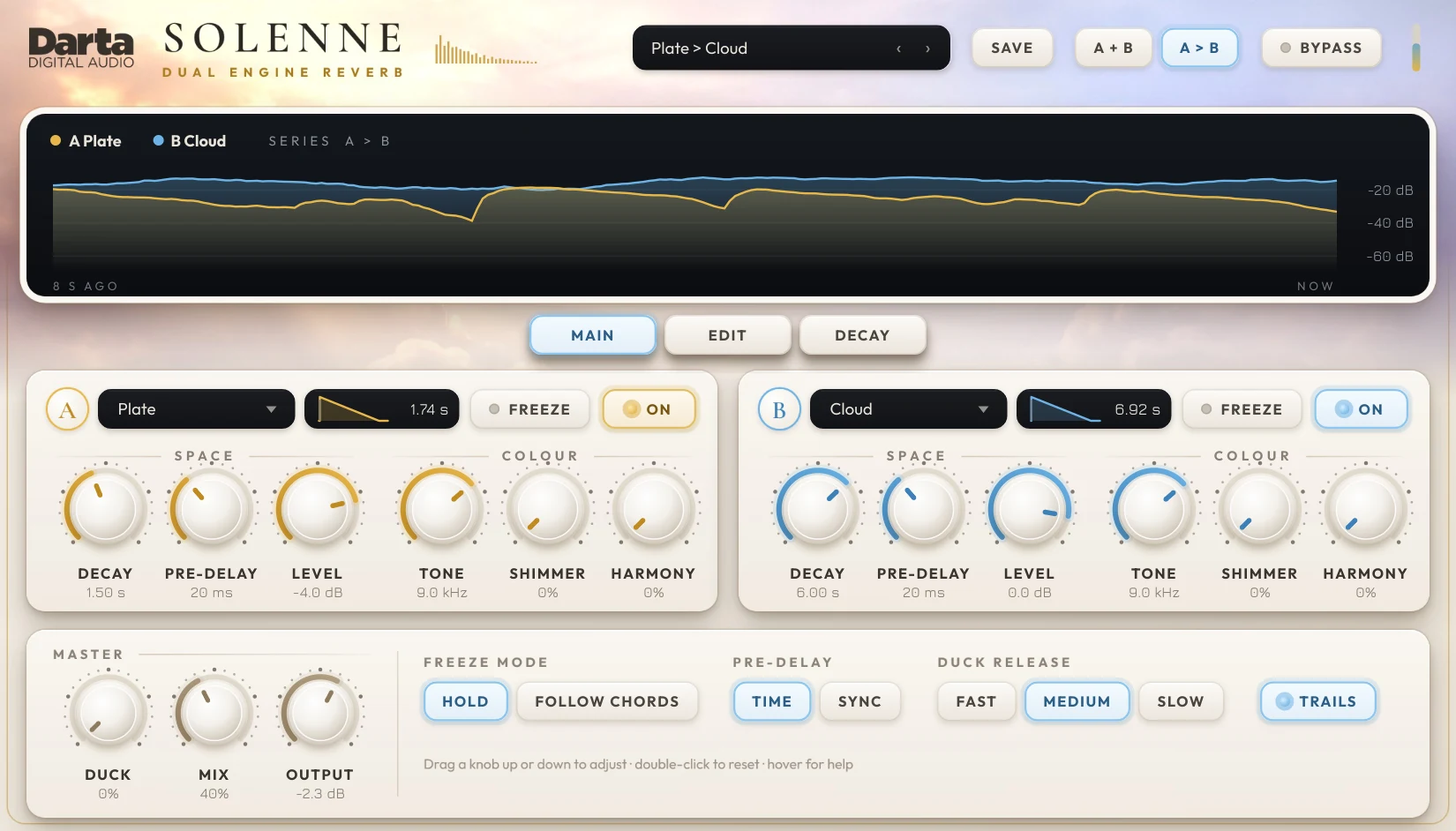
At the top, the tail display. In the middle, one card per engine, with three pages of knobs: MAIN, with what you reach for all the time, EDIT, with the fine adjustments, and DECAY, with how long the lows and highs ring. At the bottom, the global controls.
Preset, SAVE, routing and bypass
The top bar picks the sound, saves your own and sets how the two engines are connected.
Preset
The 40 factory presets, by category, followed by the User section with your own. All level-matched.
SAVE
Saves the current sound under any name. From the same menu you can delete one of your presets or open their folder (Documents\Darta Digital Audio\Solenne\Presets).
Routing
A + B (parallel): both engines hear the guitar. A > B (series): engine B reverberates engine A’s tail.
BYPASS and meter
BYPASS switches the effect off (with TRAILS on, the tail fades by itself). The small bar next to it shows the level reaching the plugin. The ‹ › arrows in the preset box step to the previous and next preset.
The tail, drawn
The display shows the level of each engine's tail over the last 8 seconds: gold for A, blue for B.
The curves
Watch the tail rise when you play and fade with the DECAY. With Ducking on, you can see it drop while you play.
Indicators
The FREEZE badge lights up on a frozen engine. With Harmony on, the notes the plugin is using appear in gold. The DUCK bar shows how much the tail is lowered right now. An engine that is switched off shows (off).
MAIN, EDIT and DECAY
The three tabs below the display switch both engines’ knobs: MAIN for space and colour, EDIT for shape and motion, DECAY for the decay of the lows and highs.
Algorithm, envelope, FREEZE and ON
Each engine has its own card: A in gold and B in blue, with the same controls.
Algorithm
Picks one of the ten algorithms for this engine.
Envelope
The drawing shows the engine over time: the pre-delay (thin line), the fall to -60 dB and the total time on the right. Its shape changes for Gated, Reverse and FREEZE (∞).
FREEZE
Holds this engine’s tail, with no loss of level, so you can play on top.
ON
Switches the engine on or off. B starts off; while off, its knobs are dimmed and it uses no processing.
The space
How big the reverb is in time, and the engine's level. Engine B has the same three knobs.
DECAY
How long the tail takes to fade, from 0.1 to 20 s. In Gated it becomes GATE (how long the gate stays open) and in Reverse it becomes WINDOW (the length of the reversed stretch).
PRE-DELAY
The gap between the note and the start of the reverb, 0 to 500 ms, or note values (1/64 to 1/4) in SYNC mode.
LEVEL
The engine’s level, from -40 to +6 dB.
The colour
The brightness of the tail and what Solenne adds to it.
TONE
The colour of the reverb (high cut at the engine’s output), 1 to 20 kHz. Turn left for dark and distant; right for open and bright. How much the tail darkens over time is set by HIGHS, on the DECAY page.
SHIMMER
The level of the pitched tail, which has a reverb of its own. At 0, no shimmer. The interval is on the EDIT page.
HARMONY
How much the resonances tuned to your chord show up in the tail.
Global controls
The bottom row is always on screen and applies to both engines.
DUCK
How much the tail drops while you play.
MIX
The balance between guitar and reverb. Up to 50% the guitar stays whole and the reverb comes on top.
OUTPUT
The final level, from -24 to +12 dB. Presets are already level-matched.
FREEZE MODE
Hold: FREEZE holds whatever is ringing. Follow chords: each new chord is captured by itself.
PRE-DELAY
TIME: in milliseconds. SYNC: in note values, at the DAW tempo (or TAP).
DUCK RELEASE
How fast the tail comes back after you stop playing: Fast, Medium or Slow.
TRAILS
Lit: bypassing the effect doesn’t cut the tail.
TAP
Standalone app only: tap along to set the tempo for pre-delay in SYNC mode.
The shape of the space
Fine adjustments to each engine's size and character.
SIZE
The size of the space. Changes the distances of the reflections without changing the DECAY time.
DIFFUSION
Density: low lets you hear separate echoes; high makes a smooth tail. In Spring it becomes DRIP, how much the spring “drips”.
LOW CUT
Removes lows from the tail, 20 to 600 Hz. Keeps the reverb clear without touching your guitar’s low end.
Motion
What gives the tail life and width.
MOD
A slow movement inside the reverb that keeps the tail alive and free of metallic ringing.
WIDTH
Stereo width, from mono (0%) to extra wide (150%).
INTERVAL
The shimmer interval: -12, +7, +12, +19 or +24 semitones.
Lows and highs
How long the lows and the highs ring compared with the DECAY, like a real room. Engine B has the same two knobs.
BASS
How long the lows ring compared with the DECAY, x0.5 to x2 (x1 = the same). Real rooms sit around x1.2: the low end holds a little longer.
HIGHS
How long the highs ring, x0.2 to x1. Below x1 the tail gets darker as it fades, like the air in a room; TONE only sets the colour.
Getting the most out of it
Reverb used well is half of your tone. These ideas work with any algorithm.
Start with Mix
To sit in a band, Mix between 20 and 35%. Above 50% the reverb becomes the main sound, great for soundscapes and ambient.
Pre-delay separates the note
20 to 60 ms of PRE-DELAY keeps the pick attack clean before the tail arrives. In SYNC mode, 1/16 or 1/8 locks to the groove.
Take the lows out of the tail
For rhythm parts, raise LOW CUT (EDIT page) to 150-250 Hz. The tail stays clear and doesn’t fight the bass.
Two engines, two jobs
A short engine (Room or Plate) for body and a long one (Hall or Cloud) quietly behind it. Balance them with each engine’s LEVEL.
Series for textures
Plate > Cloud or Spring > Hall in series create spaces a single reverb can’t. Keep engine A shorter than B.
Ducking for leads
With DUCK between 50 and 80%, the lead stays up front and the tail shows up between phrases. Great with Hall and Shimmer.
Harmony likes a clean guitar
Harmony uses the note detector: it recognizes clean, well-picked chords best. Distortion before the plugin confuses the notes.
Freeze as a pad
Turn on Follow chords, freeze a Cloud or Harmonic and play the melody on top. With every new chord, the pad follows.
40 presets to get started
Grouped by type of sound, all level-matched. And you can save your own.
Rooms & Halls · 8
Plates & Springs · 8
Ambient & Shimmer · 8
Special · 8
Dual Engine · 8
Try before you buy
Download the trial with everything unlocked: both engines, all ten algorithms, freeze and shimmer. The only difference is that the sound drops out for 3 seconds every 45 seconds and presets can’t be saved. Like it? Buy a license and paste the key into the plugin, no reinstall needed.
Windows 10 and 11 (VST3 and standalone) and macOS 10.15 or newer (AU, VST3 and standalone).
Specifications
System
Windows 10 or 11, 64-bit. macOS 10.15 or newer (Intel and Apple Silicon).
Formats
Windows: VST3 and standalone application. Mac: AU, VST3 and standalone application.
Engines
2 engines (A and B), in parallel or in series, each with its ON button.
Algorithms
Room, Hall, Cathedral, Plate, Spring, Shimmer, Cloud, Reverse, Gated and Harmonic.
Decay
From 0.1 to 20 seconds, with separate times for lows (x0.5 to x2) and highs (x0.2 to x1), plus endless Freeze.
Pre-delay
0 to 500 ms, or 1/64 to 1/4 at the tempo.
Presets
40 factory presets, level-matched, plus your own.
License
One license key activates up to 2 computers. Once activated, it works offline.
FAQ
Does it work with any guitar?
Yes. Solenne is a reverb: anything you feed it gets the space. The features that listen to notes (Harmony and the chord-following freeze) work best with a clean guitar, straight into the interface.
Can I use it on vocals, keys or a mix?
Yes. The algorithms work on any source. Only Harmony and the chord-following freeze were designed for chord instruments.
What is series mode?
Engine B reverberates the output of engine A instead of the guitar. That way the tail of a plate, for example, turns into a long cloud. In parallel, both reverberate the guitar side by side.
Does the freeze get stuck on one chord?
In Hold mode, yes: it holds what was ringing until you switch it off. In Follow chords mode, it changes by itself when you pick a different chord (at least two new notes). Single melody notes don’t change it.
Is there any latency?
No. The reverbs respond instantly. Only Reverse, by nature, waits for a short stretch so it can play it backwards.
What happens when I bypass it?
With TRAILS on (the default), the reverb input closes and the tail fades naturally. With TRAILS off, the tail stops too.
Can I switch presets from a MIDI floorboard?
Yes. A Program Change message selects the factory preset in menu order (0 to 39). Any knob can also be controlled with your DAW’s MIDI Learn.
Do I need an internet connection?
Only to activate. After that, Solenne works offline.
Can I use it on more than one computer?
Yes, each license key activates up to 2 computers. To move it, deactivate it on the old computer from inside the plugin (click the Darta logo).
How do I get the plugin?
Right after payment, you get the download link and your license key by e-mail. Both are also in My account.
What currency will I be charged in?
Darta is based in Brazil, so checkout is in Brazilian Reais (BRL): the US$ 49 price is converted at the day’s exchange rate. PayPal or your card issuer converts it back automatically and shows the exact amount in your currency before you confirm. Depending on their conversion rate, the final amount may differ slightly from US$ 49.
Is there a Mac version?
Yes. Solenne runs natively on Apple Silicon and Intel Macs, macOS 10.15 or newer, as AU, VST3 and standalone.
Is there a trial version?
Yes. Leave your e-mail under Try before you buy and download it right away. Everything works; the sound just drops out for 3 seconds every 45 seconds and presets can’t be saved. Once you buy, just paste the key into the plugin.
Play inside the sky.
Charged in Brazilian Reais (BRL), converted from US$ 49 at the day’s exchange rate. PayPal or your card converts it back and shows the exact amount in your currency before you confirm. Download link and license key by e-mail right after payment.