
DARTA DIGITAL AUDIO · DUAL ENGINE DELAY FOR GUITAR
OSTINATO
Two complete delays in one plugin, with ten kinds of repeats: from worn tape to crystal-clear digital, from ping-pong to repeats that play the notes of your chord. With freeze, ducking and DAW tempo, from slapback to endless ambience.
Charged in Brazilian Reais (BRL), converted from US$ 49 at the day’s exchange rate. PayPal or your card converts it back and shows the exact amount in your currency before you confirm. Download link and license key by e-mail right after payment. Windows and Mac.
A delay made for guitar
Ostinato is more than an echo. It knows when you picked, hears the chord that is ringing and uses that to decide what the repeats do.
Two delays in one
Engines A and B, each with its own type and time. Side by side (parallel) for cross rhythms, or one feeding the other (series): a slapback turning into a long echo.
Repeats that play the chord
In the Harmonic type, each repeat lands on a note of the chord you are playing: arpeggio up or down, thirds, fifths or octaves. The same polyphonic detector as the Polyharmony line.
Stays behind your hands
Ducking lowers the repeats while you play and lets them bloom in the gaps. Bypassing the effect or changing presets doesn't cut the echo: it fades by itself.
Ten delay types
Each engine picks its own. The CHARACTER knob changes its job on each type, and they all come out at the same level.
Digital
Clean, faithful repeats. CHARACTER (Spread) widens the stereo by moving one side.
Great forDotted eighths, solos, tight rhythm parts.Tape
Tape echo: the repeats darken, wobble (wow and flutter) and saturate. CHARACTER (Age) wears the tape out.
Great forClassic rock, slapback, vintage vibe.Analog
The sound of old delay pedals: dark, warm and a little dirty. CHARACTER (Age) makes it more worn.
Great forSolos, blues, repeats that fade softly.Lo-Fi
Repeats with fewer bits and less resolution. CHARACTER (Crush) goes from subtle to destroyed.
Great forTextures, indie, effects.Ping-Pong
The repeats bounce from side to side. CHARACTER (Spread) sets how wide.
Great forWide stereo, mixing, headphones.Multi-Tap
Several taps per cycle, in rhythmic patterns: Dotted, Triplets, Gallop, Golden and Cascade.
Great forRhythm parts, cascading notes.Reverse
The repeats play backwards: they swell into the note instead of fading after it. CHARACTER (Smooth) softens the seams.
Great forPsychedelia, intros, effects.Shimmer
The repeats are pitched to the interval you pick: -12, +5, +7, +12, +19 or +24 semitones, with no stacking octaves. CHARACTER (Amount) blends it.
Great forAmbient, worship, pads.Filter
A resonant filter sweeping through the repeats. MOD becomes DEPTH and CHARACTER (Rate) is the speed.
Great forFunk, auto-wah, moving effects.Harmonic
Four repeats, each on a note of the chord you play. CHARACTER (Blend) mixes in the original note.
Great forArpeggios, harmonies, melodic solos.What sets it apart
Features that usually take several pedals, or that only exist here.
Freeze on every type
The FREEZE button turns each engine’s repeats into a loop as long as the delay time, with no loss of level, so you can play on top. Works on any type.
Freeze that follows your chords
In Follow chords mode, every new chord you pick replaces the loop by itself. Single melody notes don’t change it: you can solo on top.
Harmonic
The repeats walk through the notes of the chord: Arp up, Arp down, 3rds, 5ths or Octaves. The chord and the intervals show on the display.
Feedback up to 110%
Go past 100% and the delay runs away, like a pedal. A limiter inside the loop keeps the level safe.
Ducking
The repeats drop while you play and come back in the gaps. A long delay without blurring your notes. Release is Fast, Medium or Slow.
Series or parallel
In parallel, both engines hear the guitar. In series, engine B repeats engine A’s repeats: a slapback becoming a long echo, tape running into reverse.
Tempo and TAP
Time in milliseconds (10 ms to 2 s) or in note values (1/32 to 1/1, with dotted and triplets) at the DAW tempo. In the standalone app, use TAP.
Trails, Kill dry and MIDI
With TRAILS on, bypassing doesn’t cut the repeats. KILL DRY leaves only the echo, for send/return use. Program Change switches presets.
Explore the panel
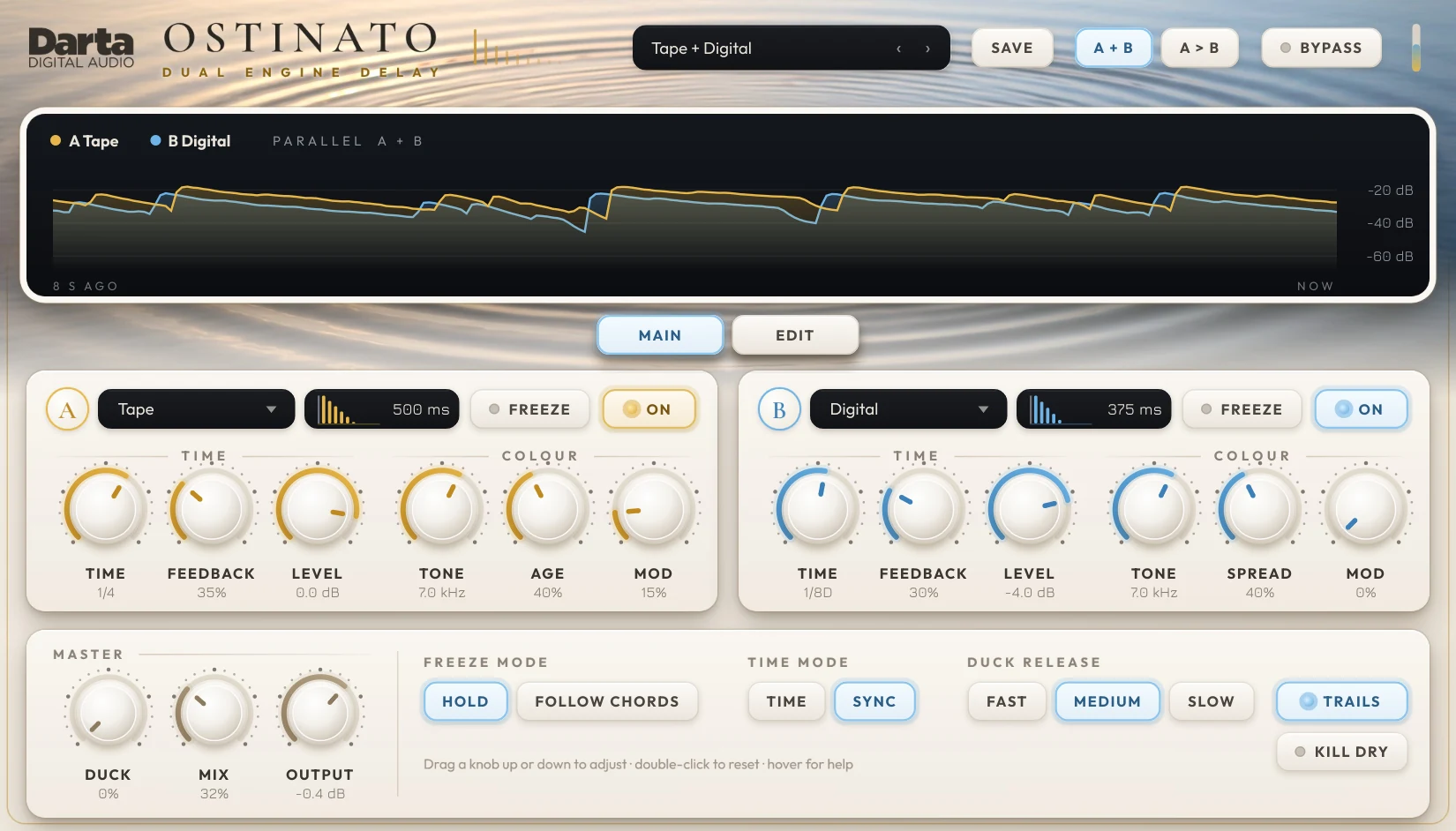
At the top, the repeats display. In the middle, one card per engine, with two pages of knobs: MAIN for what you reach for all the time, EDIT for the fine-tuning. At the bottom, the global controls.
Preset, SAVE, routing and bypass
The top bar picks the sound, saves your own and sets how the two engines are connected.
Preset
The 40 factory presets, by category, followed by the User section with your own. All level-matched.
SAVE
Saves the current sound under any name. From the same menu you can delete one of your presets or open their folder (Documents\Darta Digital Audio\Ostinato\Presets).
Routing
A + B (parallel): both engines hear the guitar. A > B (series): engine B repeats engine A’s repeats.
BYPASS and meter
BYPASS switches the effect off (with TRAILS on, the repeats fade by themselves). The small bar next to it shows the level reaching the plugin. The ‹ › arrows in the preset box step to the previous and next preset.
The repeats, drawn
The display shows the level of each engine's repeats over the last 8 seconds: gold for A, blue for B.
The curves
Watch the repeats rise when you play and fade with the FEEDBACK. With Ducking on, you can see them drop while you play.
Indicators
The FREEZE badge lights up on a frozen engine. In Harmonic, the chord the plugin is hearing and the intervals of the four repeats show up. The DUCK bar shows how much the echo is lowered right now.
MAIN and EDIT
The two tabs below the display switch both engines’ knobs: MAIN for time and colour, EDIT for tone and stereo.
Type, repeats, FREEZE and ON
Each engine has its own card: A in gold and B in blue, with the same controls.
Type
Picks one of the ten delay types for this engine.
Repeats
The drawing shows the repeats over time: how many, how loud, the Multi-Tap pattern, the ping-pong, the reverse and, in Harmonic, each note’s interval. The time is on the right.
FREEZE
Turns this engine’s repeats into a loop, with no loss of level, so you can play on top.
ON
Switches the engine on or off. B starts off; while off, its knobs are dimmed and it uses no processing.
The time
The gap between repeats, how many there are and the engine's level. Engine B has the same three knobs.
TIME
The time between repeats: 10 ms to 2 s, or note values (1/32 to 1/1, with dotted and triplets) in SYNC mode.
FEEDBACK
How many repeats. Above 100% the delay runs away, with the level kept safe by a limiter.
LEVEL
The engine’s level, from -40 to +6 dB.
The colour
The brightness of the repeats and each type's character.
TONE
High cut inside the repeats. Each pass gets a little darker.
CHARACTER
Changes with the type: Spread, Age, Crush, Smooth, Amount, Rate or Blend (see the types above).
MOD
A slow movement in the repeats, like a chorus. In Filter it becomes DEPTH, the size of the sweep.
Global controls
The bottom row is always on screen and applies to both engines.
DUCK
How much the repeats drop while you play.
MIX
The balance between guitar and delay. Up to 50% the guitar stays whole and the echo comes on top.
OUTPUT
The final level, from -24 to +12 dB. Presets are already level-matched.
FREEZE MODE
Hold: FREEZE keeps the loop as it is. Follow chords: each new chord replaces the loop by itself.
TIME MODE
TIME: in milliseconds. SYNC: in note values, at the DAW tempo (or TAP).
DUCK RELEASE
How fast the echo comes back after you stop playing: Fast, Medium or Slow.
TRAILS
Lit: bypassing the effect doesn’t cut the repeats.
KILL DRY
Only the repeats, no guitar, for send/return use.
TAP
Standalone app only: tap along to set the tempo for SYNC mode.
The tone of the repeats
Fine adjustments to the sound inside the loop.
LOW CUT
Removes lows from the repeats, 20 to 800 Hz. Keeps the echo clear without touching your guitar’s low end.
DRIVE
Saturation inside the repeats: each pass gets a little warmer.
DIFFUSION
Smears the repeats into an ambience, between delay and reverb.
Stereo and variations
Where the engine sits in the stereo field, and the control that changes with the type.
WIDTH
Stereo width, from mono (0%) to extra wide (150%).
PAN
Where the engine sits, from left to right.
PATTERN / INTERVAL / HARMONY
Changes with the type: the Multi-Tap pattern, the Shimmer interval (-12 to +24) or the Harmonic path (Arp up, Arp down, 3rds, 5ths, Octaves). On the other types it turns grey.
Tips to get the most out of it
A well-used delay is half of your tone. These ideas work with any type.
Start with Mix
To sit in a band, Mix between 20 and 35%. Above 50% the repeats are as loud as the guitar, great for ambience and effects.
Use note values
With TIME MODE on SYNC, the delay follows the song. 1/8D (dotted eighth) is the classic sound of echo-drenched guitars.
Take lows out of the repeats
Raise LOW CUT (EDIT page) to 150-300 Hz. The repeats stay clear and don’t fight the bass or your guitar.
Tone darkens each pass
Lowering TONE makes each repeat a little darker than the last, like analog delays. They fade more naturally.
Two engines, two times
One engine on 1/4 and the other on 1/8D, each on one side (PAN), make a rhythm a single delay can’t.
Ducking for solos
With DUCK between 50 and 80%, the solo stays upfront and the repeats show up in the breaths.
Harmonic likes clean guitar
Harmonic uses the note detector: it recognizes clean, well-picked chords best. Distortion before the plugin confuses the notes.
Freeze as a bed
Turn on Follow chords, freeze an Analog or a Shimmer and play the melody on top. With every new chord, the loop follows.
40 presets to start with
Organized by kind of sound, all level-matched. And you can save your own.
Classic · 7
Tape & Analog · 7
Rhythmic · 7
Ambient · 6
Creative · 7
Dual Engine · 6
Try before you buy
Download the trial with everything unlocked: both engines, all ten delay types, freeze and ducking. The only difference is that the sound drops out for 3 seconds every 45 seconds and presets can’t be saved. Like it? Buy a license and paste the key into the plugin, no reinstall needed.
Windows 10 and 11 (VST3 and standalone) and macOS 10.15 or newer (AU, VST3 and standalone).
Specifications
System
Windows 10 or 11, 64-bit. macOS 10.15 or newer (Intel and Apple Silicon).
Formats
Windows: VST3 and standalone application. Mac: AU, VST3 and standalone application.
Engines
2 engines (A and B), in parallel or in series, each with its ON button.
Types
Digital, Tape, Analog, Lo-Fi, Ping-Pong, Multi-Tap, Reverse, Shimmer, Filter and Harmonic.
Time
10 ms to 2 s, or 1/32 to 1/1 (with dotted and triplets) at the tempo.
Feedback
0 to 110%, with a limiter in the loop, plus endless Freeze.
Presets
40 factory presets, level-matched, plus your own.
License
One license key activates up to 2 computers. Once activated, it works offline.
FAQ
Does it work with any guitar?
Yes. Ostinato is a delay: anything you feed it gets repeats. The features that listen to notes (Harmonic and the freeze that follows chords) work best with a clean guitar straight into the interface.
Can I use it on vocals, keys or a mix?
Yes. The types work on any source. Only Harmonic and the chord-following freeze were designed for chord instruments.
What is series mode?
Engine B repeats the output of engine A instead of the guitar. A short slapback, for example, gets a long echo behind it. In parallel, both repeat the guitar side by side.
How does Harmonic know the chord?
A polyphonic detector listens to the guitar and recognizes the chord (major or minor) on every pick. The repeats land on that chord’s notes, starting from the highest note you played.
Does feedback above 100% blow up?
No. Above 100% the repeats grow like a self-oscillating pedal, but a limiter inside the loop holds the level.
Can I use it on a send?
Yes. Turn on KILL DRY: only the echo comes out, no guitar, and you set the amount with your DAW’s send.
Can I switch presets from a MIDI controller?
Yes. A Program Change message selects the factory preset in menu order (0 to 39). Any knob can also be controlled with your DAW’s MIDI Learn.
Do I need an internet connection?
Only to activate. After that, Ostinato works offline.
Can I use it on more than one computer?
Yes, each license key activates up to 2 computers. To move it, deactivate it on the old computer from inside the plugin (click the Darta logo).
How do I get the plugin?
Right after payment, you get the download link and your license key by e-mail. Both are also in My account.
What currency will I be charged in?
Darta is based in Brazil, so checkout is in Brazilian Reais (BRL): the US$ 49 price is converted at the day’s exchange rate. PayPal or your card issuer converts it back automatically and shows the exact amount in your currency before you confirm. Depending on their conversion rate, the final amount may differ slightly from US$ 49.
Is there a Mac version?
Yes. Ostinato runs natively on Apple Silicon and Intel Macs, macOS 10.15 or newer, as AU, VST3 and standalone.
Is there a trial version?
Yes. Leave your e-mail under Try before you buy and download it right away. Everything works; the sound just drops out for 3 seconds every 45 seconds and presets can’t be saved. Once you buy, just paste the key into the plugin.
Play in waves.
Charged in Brazilian Reais (BRL), converted from US$ 49 at the day’s exchange rate. PayPal or your card converts it back and shows the exact amount in your currency before you confirm. Download link and license key by e-mail right after payment.