
DARTA DIGITAL AUDIO · DISTORTION PLUGIN

The metal distortion with a parametric mid, modeled part by part: two gain stages, diodes to ground and an EQ with ±20 dB LOW and HIGH plus a MID you can sweep from 230 Hz to 5.4 kHz. Plus TIGHT, GATE and a SMOOTH voice with less fizz.
Charged in Brazilian Reais (BRL), converted from US$ 19 at the day’s exchange rate. PayPal or your card converts it back and shows the exact amount in your currency before you confirm. Download link and license key by e-mail right after payment. Windows and Mac.
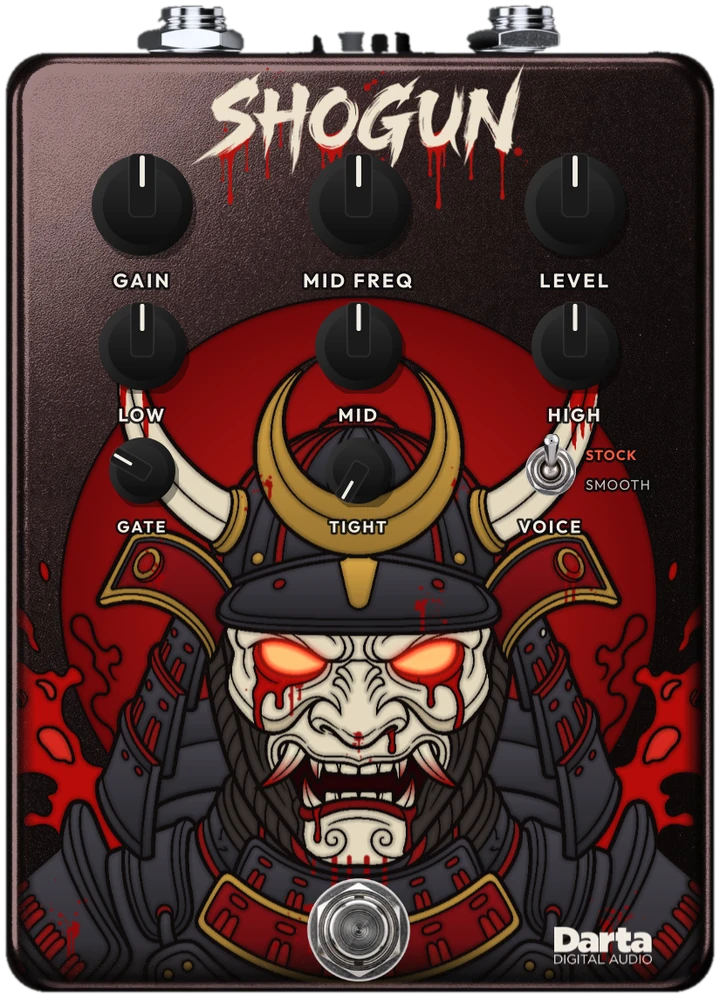
The most debated distortion in metal.
In the 90s, one distortion pedal became the shortcut to a metal sound: gain to spare and an equalizer with a parametric mid, something rare in a pedal. Set it badly and it buzzes; set it right and it becomes a wall. Shogun models that circuit with the schematic's values, with the gain calibrated to a real guitar's level, and adds what it was missing: TIGHT for low tunings, a gate that listens to your guitar and the SMOOTH voice.

The real circuit
Two op-amp gain stages, pre- and post-emphasis built with gyrators (the transistors that act as inductors and give the pedal its character) and the diodes to ground between them, just like the original schematic.
EQ with a parametric mid
±20 dB LOW and HIGH after the distortion, plus a ±16 dB MID you can place anywhere from 230 Hz to 5.4 kHz.
Built for modern metal
TIGHT removes low end before the distortion, GATE closes in the pauses between riffs and the SMOOTH voice takes the fizz out of the highs.
The controls
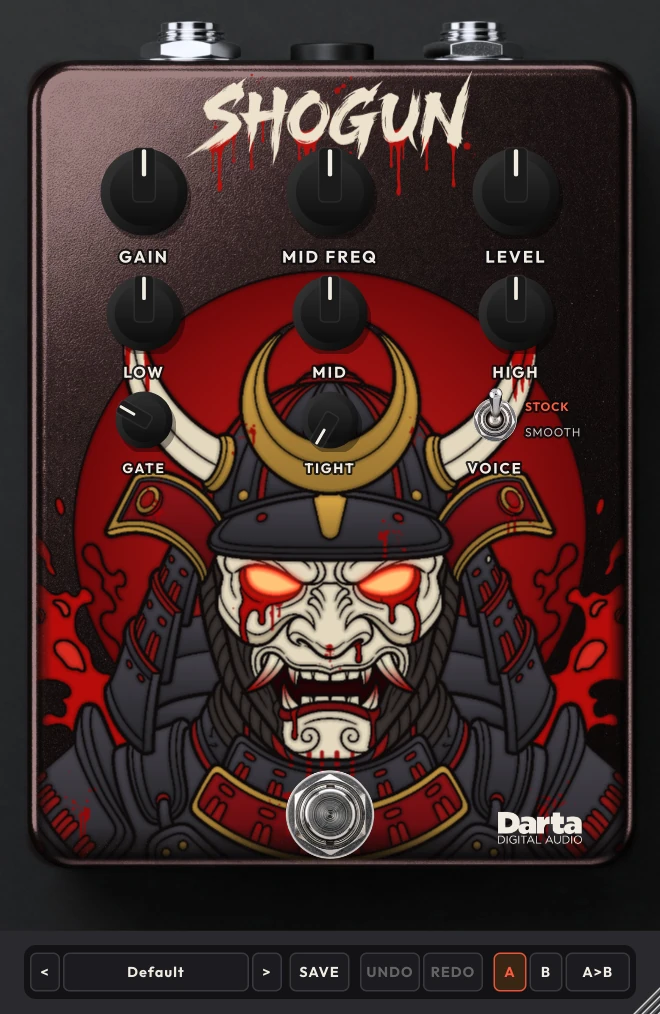
Eight knobs, one switch and the footswitch. All of them can be automated in your DAW.
GAIN
The gain: two op-amp stages and the hard clipping of the diodes. At 3 it’s already metal distortion; above that, the wall. At 0 there’s still some crunch, as in the original circuit.
MID FREQ
Where the MID works, from 230 Hz to 5.4 kHz. At 4, around 1 kHz.
LEVEL
The pedal’s volume. At 3 it matches the level of the guitar with the pedal off; above that, up to +24 dB.
LOW
The low end around 100 Hz, after the distortion, with ±20 dB. At 5 it’s flat.
MID
The mids, with ±16 dB, at the MID FREQ frequency. Cut for the scooped sound; boost to make the guitar stand out or the lead sing. At 5 it’s flat.
HIGH
The highs, with ±20 dB, on a shelf that rises from 1 kHz. At 5 it’s flat.
GATE
Closes in the pauses. It listens to the clean guitar, before the pedal, so it doesn’t eat the end of your notes. At 0 it is off.
TIGHT
Removes low end before the distortion (from 20 to 400 Hz): the lows stay firm in fast picking and low tunings. At 0, the original circuit.
VOICE
STOCK is the original circuit. SMOOTH lowers the pre-emphasis and tames the 4.8 kHz peak: less fizz and a smoother sound.
FOOTSWITCH
Turns the pedal on and off, with no click. With the pedal on, the mask’s eyes light up.
The sweeping mid
MID FREQ is this pedal's secret: the same MID changes character depending on where it works. With MID at 5 nothing changes; the further from 5, the bigger the difference.
230 to 700 Hz
The low mids: the weight of your chords. Cut, you get the scooped thrash sound; boosted, a thick wall.
Great forHeavy rhythm, doom, scooped tones.700 Hz to 2 kHz
The guitar's middle: this is where it stands out or disappears in the band. Boosted, the sound comes forward and leads sing.
Great forRiffs that need to be heard, leads.2 to 5.4 kHz
The upper mids: pick attack and bite. Boosted, it cuts like a saw; cut, it removes the buzz.
Great forFast picking, shred, aggressive tones.STOCK or SMOOTH
The VOICE switch changes the filter that comes before the distortion.
STOCK
The original circuit: strong pre-emphasis, the full 4.8 kHz peak and all of the pedal's attack and bite.
SMOOTH
Less pre-emphasis and a tamer 4.8 kHz peak: less fizz in the highs and a smoother sound, great for leads and very bright guitars.
16 presets to start with
In four categories. And you can save your own with SAVE, compare two settings with A and B, and undo with UNDO.
Classic · 4
Metal · 4
Lead · 4
Special · 4
Tips to get the most out of it
Ideas to get started.
Start at 3
With LEVEL at 3, switching the pedal on and off doesn’t change the volume, so you judge the sound, not the loudness.
Less gain than you think
GAIN at 3 is already plenty. For rhythm, stay between 3 and 5; too much gain smears your chords.
The thrash scoop
GAIN 5, LOW 8, HIGH 7, MID 2 and MID FREQ 4: lows and highs up front, mids pushed back.
Low tunings
TIGHT between 5 and 7 and GATE at 5: the lows stay firm and the pauses stay dry.
A lead that sings
MID at 8 and MID FREQ at 6: the note comes forward and sustains. With VOICE on SMOOTH, it gets even smoother.
Before the amp
Put Shogun before your amp simulator, with a clean or low-gain amp, just like a pedal on the floor.
Under the hood
Modeled circuit
The op-amps have the voltage, speed and bandwidth limits of the real part, and the diodes are solved with the real equation. The EQ is calculated as a circuit: the knobs turn without clicks.
16x oversampling
The distortion runs at 16x your DAW's rate, so the highs stay clean, with no aliasing.
Calibrated gain
The input is calibrated to the level of a guitar going into a pedal: GAIN responds like the original's.
Gate before the pedal
The gate listens to the clean guitar, before the pedal, and only closes what comes after it: notes end naturally.
Try before you buy
Download the trial with everything unlocked: every control, all 16 presets and the standalone app with amp and cabinet. The only difference is that the sound drops out for 3 seconds every 45 seconds and presets can’t be saved. Like it? Buy a license and paste the key into the plugin, no reinstall needed.
Windows 10 and 11 (VST3 and standalone) and macOS 10.15 or newer (AU, VST3 and standalone).
Specifications
System
Windows 10 or 11, 64-bit. macOS 10.15 or newer (Intel and Apple Silicon).
Formats
Windows: VST3 and standalone application. Mac: AU, VST3 and standalone application.
License
One license key activates up to 2 computers. Once activated, it works offline.
Controls
Gain, Mid Freq, Level, Low, Mid, High, Gate, Tight, Voice and footswitch.
Channels
Mono or stereo. A mono guitar comes out on both sides.
FAQ
Which pedal is it based on?
On the MT-2 Metal Zone, one of the best-known (and most debated) metal distortion pedals. MT-2 and Metal Zone are trademarks of Boss (Roland); Darta is not affiliated with it and the names are used here only to describe the style of sound.
Why does the original have a reputation for being hard to dial in?
Because the EQ is very strong: ±20 dB on LOW and HIGH and ±16 dB on MID. With everything maxed, it buzzes. The trick is to move things a little and use MID FREQ to find your guitar’s sweet spot. The presets are a good start.
Does it work with low tunings and 7-string guitars?
Yes. Use TIGHT to keep the lows from getting muddy and GATE to keep the pauses dry.
Is there latency?
Only 5 samples (about 0.1 ms at 48 kHz), because of the oversampling: imperceptible. The bypassed sound is delayed by the same amount, so switching on and off sounds seamless.
Is there a Mac version?
Yes. SHOGUN runs natively on Apple Silicon and Intel Macs, macOS 10.15 or newer, as AU, VST3 and standalone.
Do I need internet to use it?
Only to activate it. After that, SHOGUN works offline.
Can I use it on more than one computer?
Yes, each license key activates up to 2 computers. To move it, deactivate it on the old computer from inside the plugin.
How do I get the plugin?
Right after payment, you get the download link and your license key by e-mail. Both are also in My account.
What currency will I be charged in?
Darta is based in Brazil, so checkout is in Brazilian Reais (BRL): the US$ 19 price is converted at the day’s exchange rate. PayPal or your card issuer converts it back automatically and shows the exact amount in your currency before you confirm. Depending on their conversion rate, the final amount may differ slightly from US$ 19.
Can I play without a DAW?
Yes. The standalone app comes with a clean amp (VOLUME, BASS, MIDDLE and TREBLE) and a 1×12 cabinet, or your own IR. Just plug your guitar into your audio interface and play. In your DAW, the plugin is just the pedal, so you can use any amp and cabinet you like.
Is there a trial version?
Yes. Leave your e-mail under Try before you buy and download it right away. Everything works; the sound just drops out for 3 seconds every 45 seconds and presets can’t be saved. Once you buy, just paste the key into the plugin.
The most debated distortion in metal.
Charged in Brazilian Reais (BRL), converted from US$ 19 at the day’s exchange rate. PayPal or your card converts it back and shows the exact amount in your currency before you confirm. Download link and license key by e-mail right after payment.