
DARTA DIGITAL AUDIO · VOCAL PLUGIN
MADRIGAL
VOCAL CHAIN & HARMONIES
Pitch correction, harmonies, EQ, compression and effects for your voice, in one plugin that listens to your guitar. The harmonies follow the chords you play or the notes on your MIDI keyboard, the tuning keeps the note you meant to sing, and the twelve blocks go in whatever order you choose.
Charged in Brazilian Reais (BRL), converted from US$ 49 at the day’s exchange rate. PayPal or your card converts it back and shows the exact amount in your currency before you confirm. Download link and license key by e-mail right after payment. Windows and Mac.
A vocal chain that listens to your guitar
A madrigal is music for several voices singing together. The plugin carries that name because that is what it was built for: your voice up front, the backing voices around it, and the guitar telling the harmony where to go.
It hears your guitar
Send the guitar to the sidechain and Madrigal recognizes the chord and the key while you play. The harmony voices pick notes that fit each chord, with nothing to program. Or play the harmonies on a MIDI keyboard.
Tunes without changing your note
Smart mode corrects the pitch and keeps the note you meant to sing, even outside the scale. The key only decides when your voice lands halfway between two notes.
You build the chain
Twelve blocks, from gate to reverb. Drag them to change the order: harmonies before or after the compressor, saturation before the EQ, however you like.
How to set it up
Madrigal has two inputs: your voice, which it processes, and the guitar, which it only listens to in order to know the chords. The guitar sound does not come out of the plugin.
Put it on the vocal track
Load Madrigal as an effect on the track with your recorded vocal.
Send the guitar to the sidechain
On the guitar track, create a send to Madrigal's sidechain input (DAWs call it Sidechain or Aux input). The GUITAR indicator at the top of the screen lights up and shows the chord.
Pick a preset and press play
Start from one of the 80 presets and adjust from there. Each block has its own page with its controls, a graph of what it is doing and a HOW TO USE button with tips.
For the final take, use LEARN
Turn on LEARN, play the song once and stop. Madrigal decides every note by looking at the whole phrase, and you can fix any of them on the NOTES screen.
No guitar? It still works. With nothing on the sidechain, the key is found from the notes you sing, in a few seconds. Tuning, effects, LEARN and Shape work the same; only the harmonies follow the scale instead of each chord. In the standalone app, input 1 is the voice and input 2 is the guitar.
To record while hearing the effect, turn on TRACKING. Latency drops to zero and Tune keeps correcting live, with a few milliseconds of delay, together with the effects. The harmonies wait for the mix: when you mix, turn TRACKING off.
Twelve blocks, in any order
Each block switches on and off on its own and has its own A/B button, a live graph and usage tips. The gold ones take care of the voice and the notes; the green ones, of the sound.
Gate
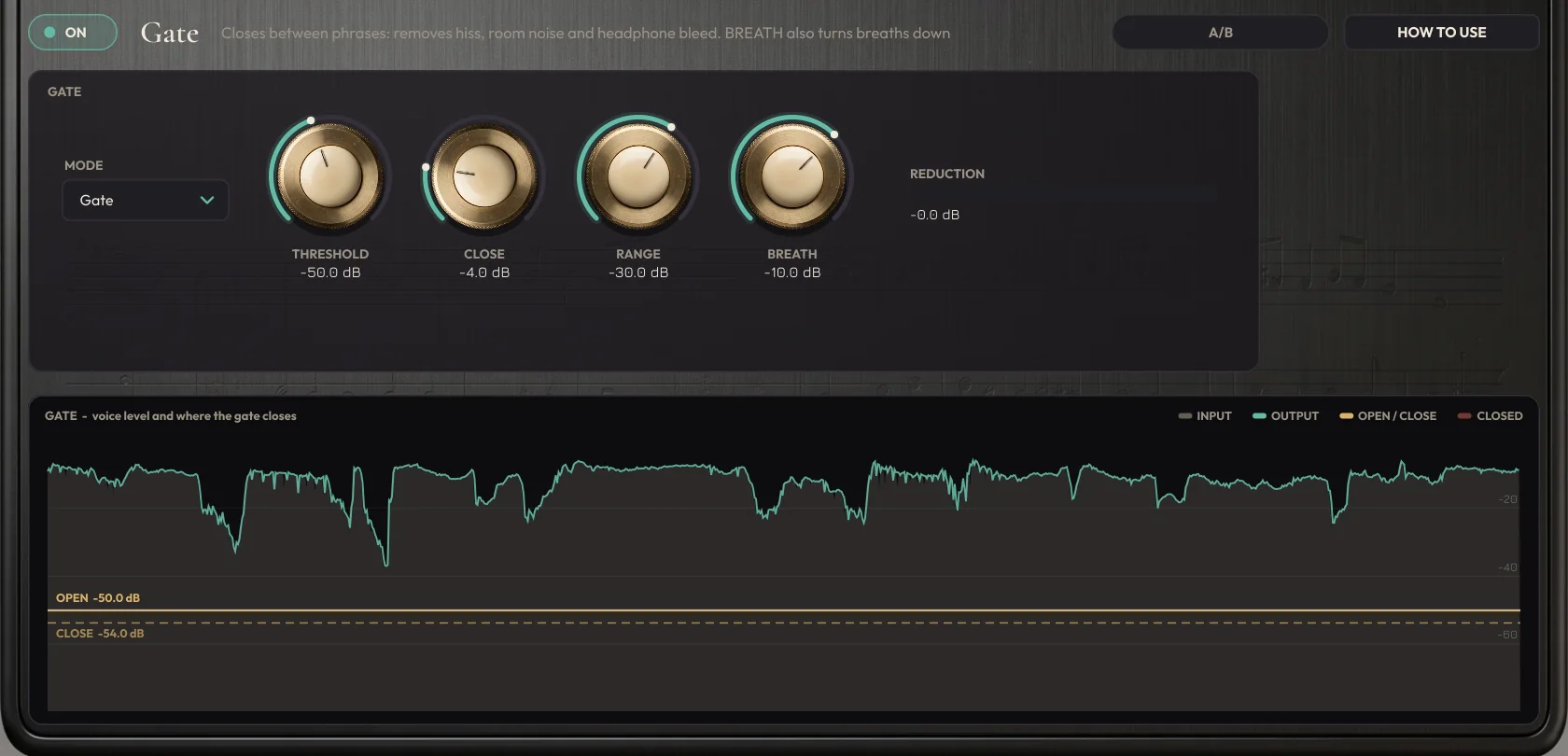
Closes in the silences between phrases, removing hiss, room noise and headphone bleed, looking 5 ms ahead so the first consonant is never cut. BREATH mode turns down only the breaths. The CLEAN-UP section removes background noise (NOISE) and mains hum (HUM) before the whole chain.
Tune
Pitch correction in Smart, Scale, Chord and Chromatic modes, with Speed, Humanize and Tolerance. It also works live, in TRACKING mode.
Harmony
Up to four backing voices. Each one follows the guitar chord, the scale, a fixed interval or the notes from a MIDI keyboard, in mono or stereo.
Leveler
Evens out loud and soft phrases before the compressor, like an engineer riding the fader. It only moves while you sing: breaths and silences never get pulled up.
De-esser
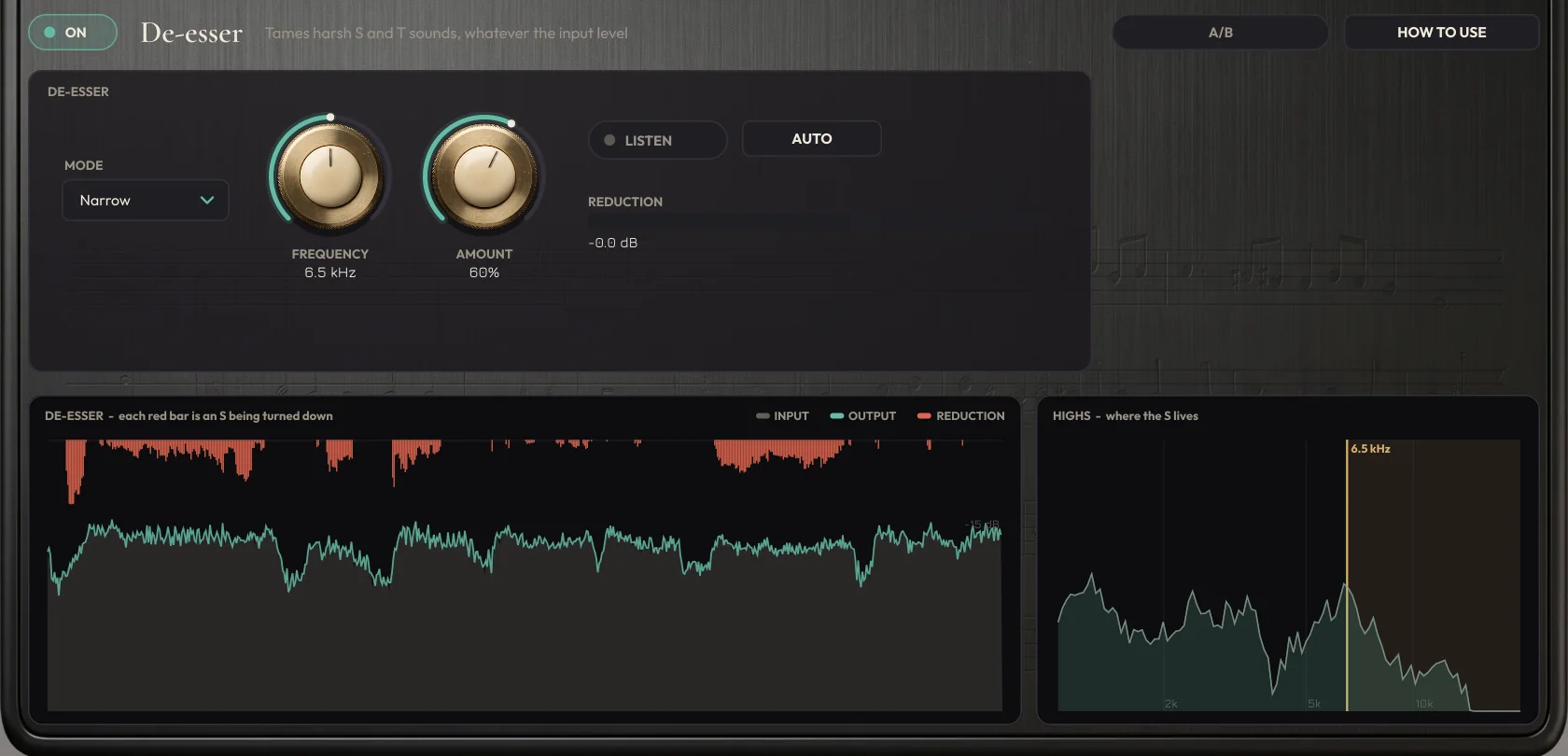
Tames harsh S and T sounds the same way whether the voice is loud or soft. NARROW works on a thin band at the S; WIDE on everything above the frequency. AUTO finds the frequency of your S.
EQ
Shape, an automatic EQ that analyzes your voice, plus low cut, two shelves, four bands and high cut, with SOLO on every band. Tame and Mud act only when the problem shows up.
Compressor
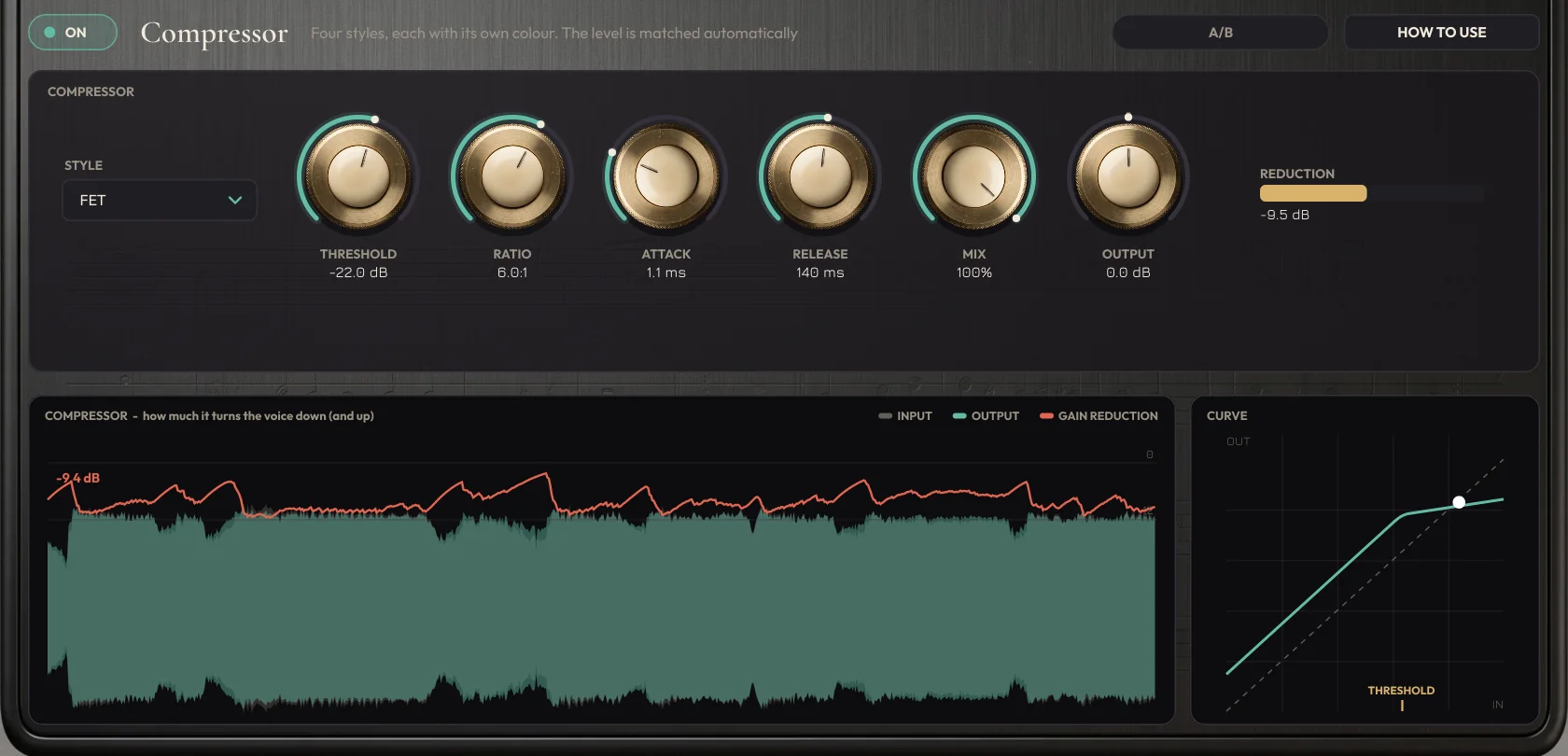
Opto (smooth), FET (upfront), Squash (dense and clean) and Grit (heavy and grainy), with threshold, ratio, attack, release and mix for parallel compression. The level is matched automatically, and AUTO finds the threshold by listening to your voice.
Saturation
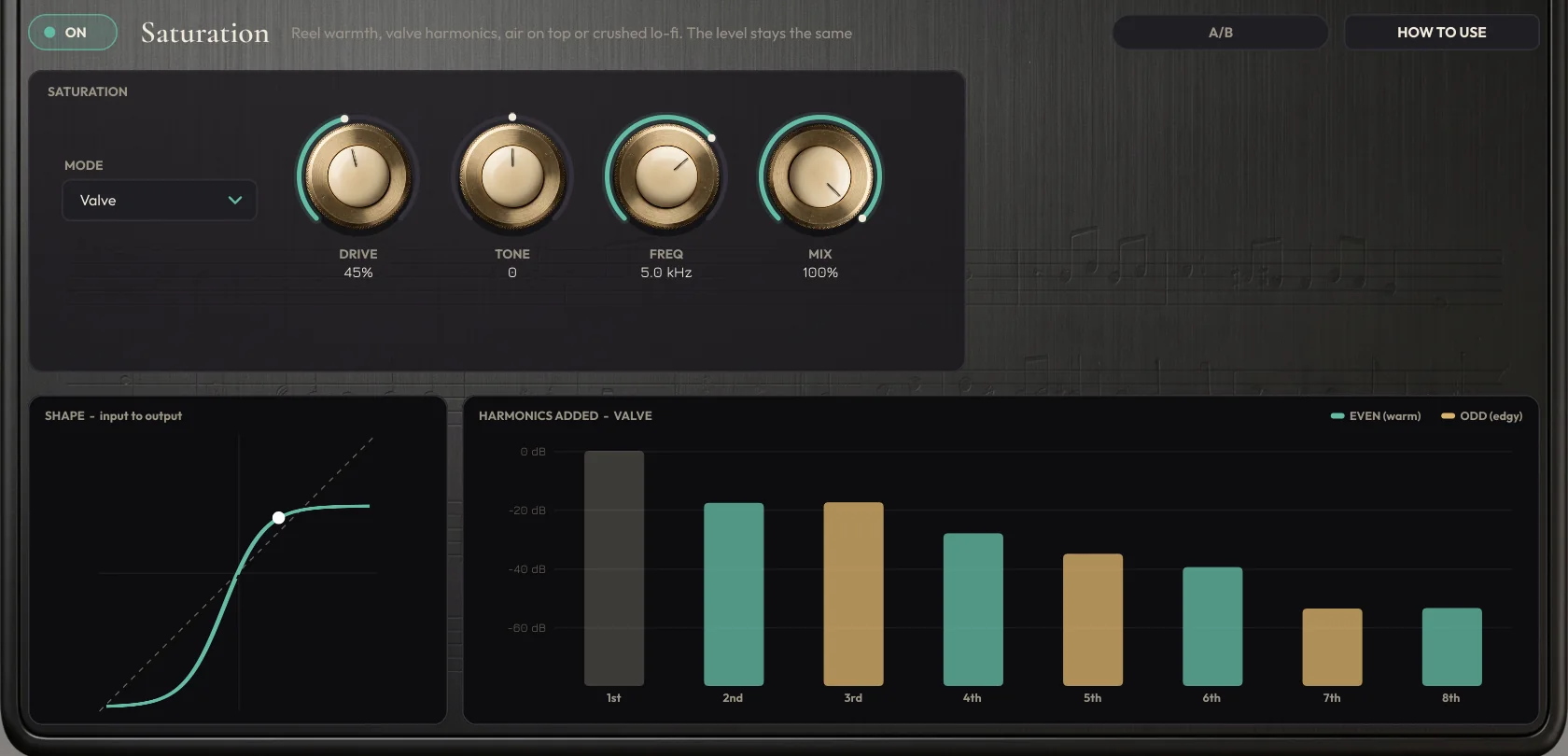
Reel (tape), Valve (tube), Air (sparkle on the highs only) and Crush (lo-fi), with the level kept the same while you turn DRIVE.
Doubler
Simulates a double-tracked vocal with 2, 4 or 6 slightly different copies spread in stereo, and stays safe in mono.
Modulation
Chorus, flanger or phaser, with the rate in Hz or following the song tempo.
Delay
Analog, tape, digital or ping-pong, synced to your DAW. Ducking pulls the echoes down while you sing, and the low cut removes lows from the repeats only.
Reverb
Room, Hall, Plate, Cathedral, Cloud and Shimmer, plus eight modelled convolution spaces, from Booth to Church and two plates, with pre-delay, ducking and a low cut on the reverb only, so the voice stays up front.
What makes Madrigal different
Features that usually take several plugins, or that only exist here.
Male or female voice
A selector at the top adapts pitch detection and the voice-dependent frequencies (low cut, EQ and de-esser). Every preset works for male and female singers.
Harmonies as MIDI
REC MIDI records the notes of the lead and of every harmony voice while the song plays. Drag the file into your DAW and double the voices with a synth, strings or a choir.
Clean-up: noise and hum
NOISE removes hiss, fans and air conditioning, learning the noise by itself from the pauses. HUM removes 50 or 60 Hz mains hum, or finds which one in Auto.
Eight convolution spaces
Booth, Studio, Live Room, Chamber, Concert Hall, Church, Gold Plate and Vintage Plate, modelled from the acoustics of real rooms and plates, with no extra latency.
Compressor AUTO
Sing for about 8 seconds and the compressor finds the threshold so the louder words get about 6 dB of reduction, in any style.
Resizable window
Drag the corner and Madrigal goes from half to double its size, keeping its proportions. The size is saved with the project.
LEARN and the NOTES screen
Play the song once with LEARN on. Madrigal analyzes the whole track and decides every note by looking at the complete phrase, not just the moment. On the NOTES screen you see every note over the sung curve and change any of them by dragging. The analysis is saved with your project.
Shape: the EQ that listens to your voice
Press ANALYZE and sing for 10 to 30 seconds, or let LEARN do it with the whole song. Shape measures the tone of your voice and builds an EQ curve toward the target you choose: Natural, Modern, Warm, Bright or Broadcast. The level stays the same.
Harmonies from MIDI
In MIDI mode, a voice sings the notes you hold on a keyboard or on a MIDI track routed to Madrigal. The first MIDI voice takes the lowest note, the second the next one. With no note held, the voice is silent.
Record while you listen: TRACKING
One button at the top drops the latency to zero so you can record while hearing Madrigal. Tune switches to a live mode with 3 to 12 ms of delay. Turn it off to mix and Madrigal goes back to looking at the whole phrase.
Stereo harmonies
Turn on STEREO for a voice and a second singer joins on the same note, with its own position, level, timing and pitch drift. It sounds like a double-tracked backing vocal and stays safe in mono.
Level-matched A/B
Every block, and the whole chain, has an A/B button that compares with and without the effect at the same loudness. You judge the sound, not the volume.
Limiter and LUFS at the output
A limiter at the end of the chain holds the peaks at -1 dB. Next to it, the meter shows the loudness in LUFS and how much the limiter is holding back.
Live graphs
Spectrum on the EQ, gain reduction and curve on the compressor, saturation harmonics, delay echoes, reverb tail, stereo image and the notes of every harmony voice. You see what each block is doing.
HOW TO USE on every block
Every page has a button that swaps the graph for tips about that block, with values to start from. No manual needed.
A chain you can reorder
Drag the blocks. The Harmony block can go after the compressor, for example, so the backing voices are not squashed together with the lead.
Reference and tolerance
A4 from 415 to 466 Hz, for songs and guitars that are not at 440. Tolerance leaves notes that are already close alone, for a more live sound.
Your own presets
80 factory presets in 10 styles, from pop and country to podcast and robot, and a SAVE button to keep your own sounds. They show up in the list, under User.
Tour the interface
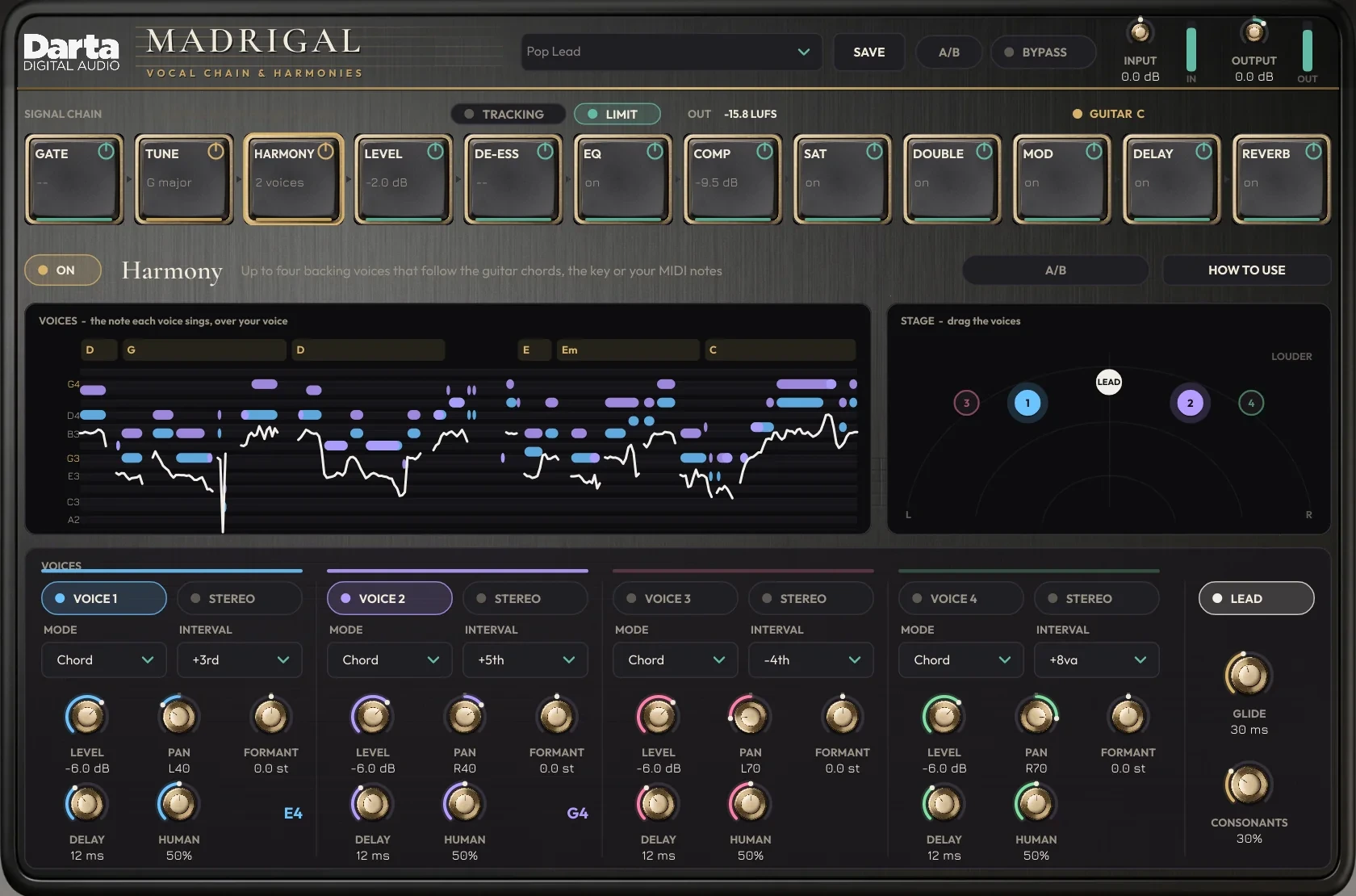
The block chain sits at the top. Click a block to open its page below, with its controls and its graph.
The signal chain
At the top: presets, the A/B for the whole chain, bypass and input and output levels. Below, the twelve blocks, in the order the sound goes through them.
Presets and SAVE
Pick one of the 80 factory presets or keep your own sound with SAVE. Yours show up in the list, under User.
VOICE
Male or female voice: Madrigal looks for the pitch in the right range and adapts the voice-dependent frequencies.
Drag
Hold a block and drop it somewhere else to change the order. The switch is click-free, even while the music plays.
On and off
The button in the corner of each block switches just that block. The bottom line of the block shows its state: the key on TUNE, the number of voices on HARMONY, the gain reduction on COMP.
TRACKING
Zero latency so you can record while hearing Madrigal. Tune switches to its live mode and the harmonies pause until you turn it off.
LIMIT and LUFS
Turns on the output limiter (-1 dB ceiling). Next to it, the short-term loudness in LUFS and how much the limiter is holding back.
GUITAR
Lights up when guitar reaches the sidechain and shows the chord. Without a guitar it says NO GUITAR and the key comes from the voice.
Top A/B
Removes the whole chain and plays the dry voice at the same loudness, so you can really compare before and after.
Colours
Gold for voice and notes (Tune, Harmony); green for processing (the effects).
Pitch correction
The note you are singing, how far off it is and where it is going. The graph shows the tuned voice over time, with the current key and chord at the top.
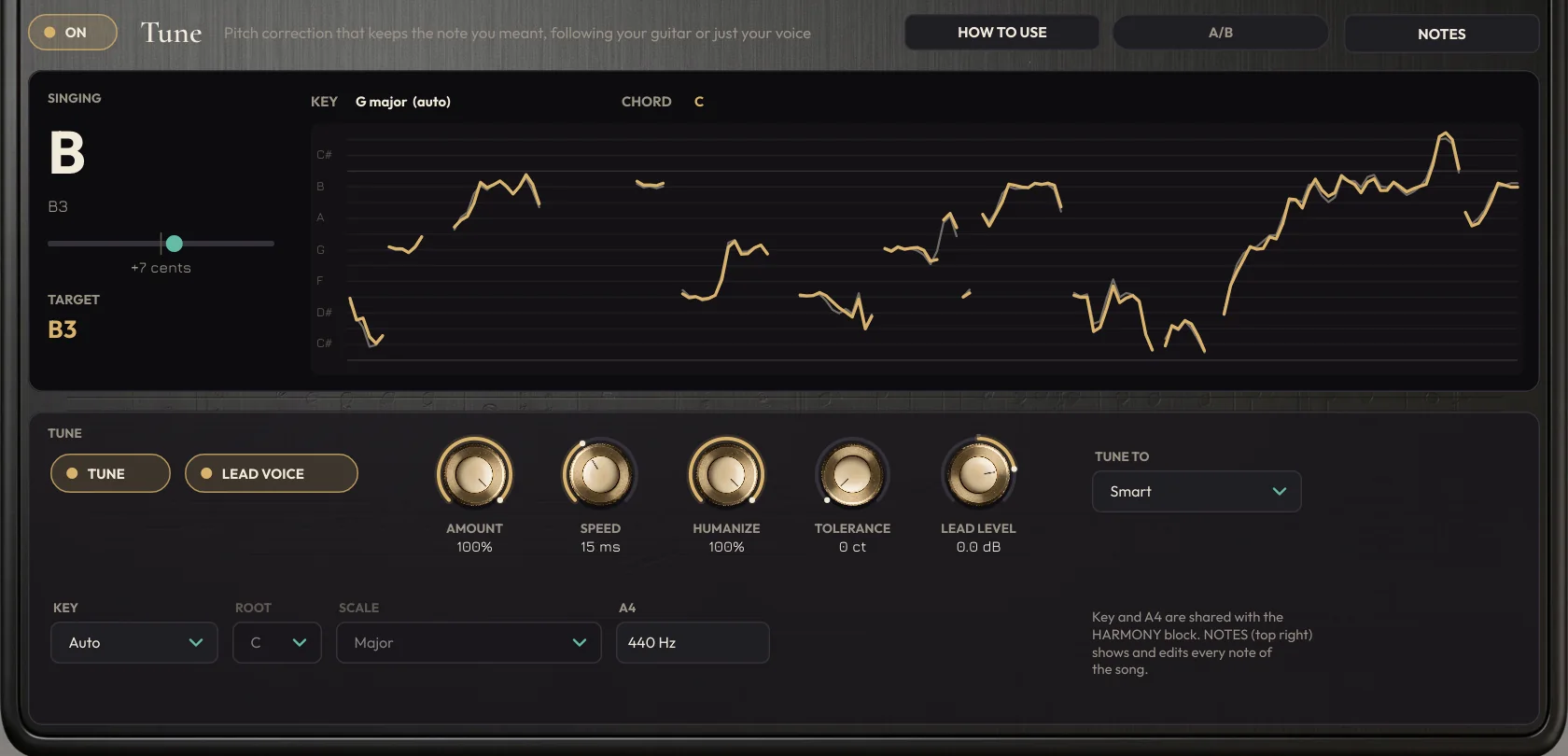
SINGING and TARGET
The sung note, its deviation in cents and the target note.
AMOUNT and SPEED
How much it corrects and how fast. Speed 0 is the robotic effect; 40 ms or more, natural.
HUMANIZE
How much of the voice’s vibrato and natural movement is kept.
TOLERANCE
Deviation, in cents, that is left uncorrected. Zero corrects everything.
TUNE TO
Smart: keeps the note you meant. Scale: always a note of the key. Chord: only notes of the guitar chord. Chromatic: the nearest semitone.
KEY and A4
Automatic key (from the guitar or the voice) or manual, and the reference pitch.
LEAD VOICE and LEAD LEVEL
Switches off or sets the level of the lead voice, to hear only the harmonies if you want.
NOTES and TRACKING
NOTES opens the whole-song notes screen, shown next. With TRACKING on, Tune corrects live, with no reported latency.
The whole song, note by note
With LEARN on, play the song once and stop. Madrigal analyzes the whole track and shows every note it decided here, over the curve you sang.
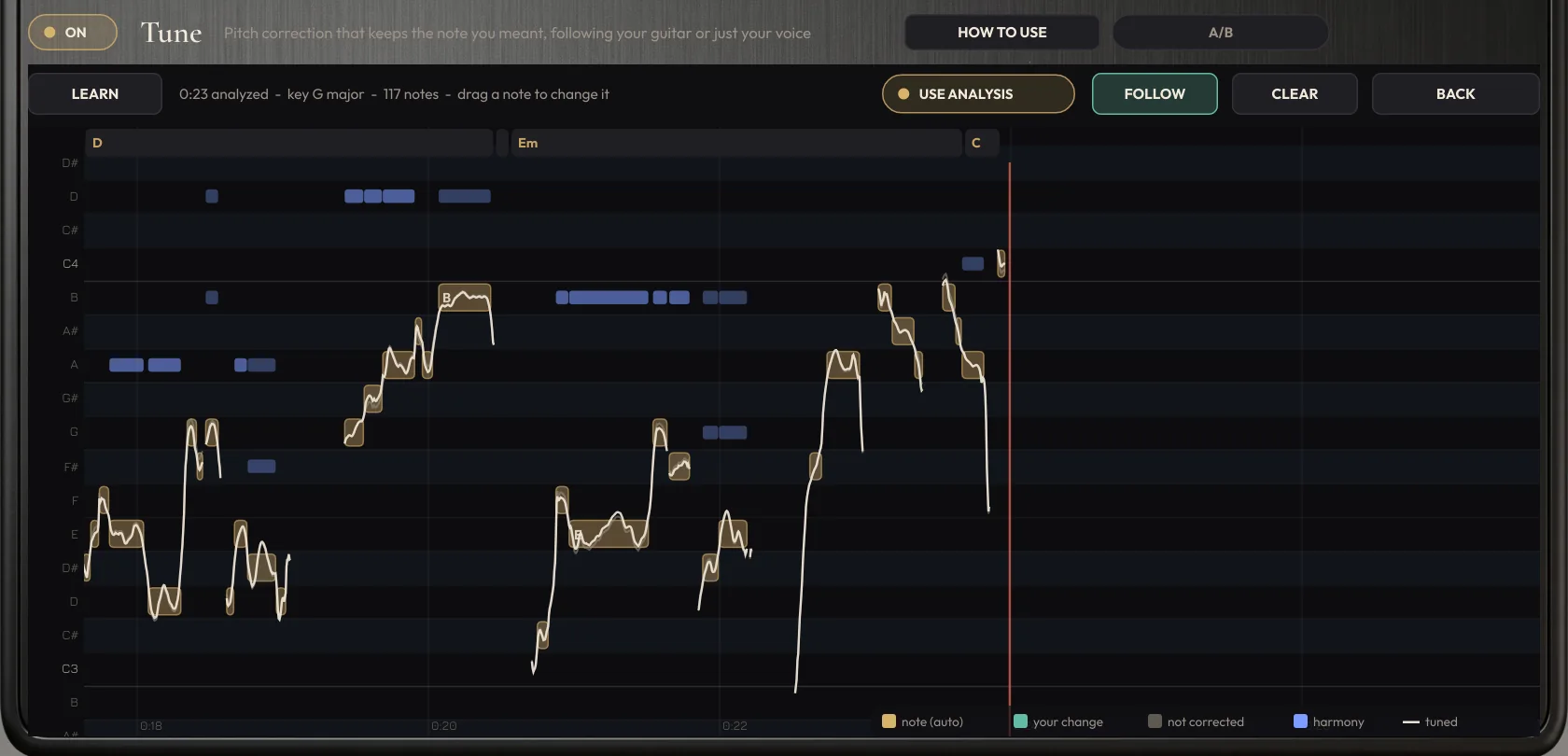
LEARN
Turns on analysis recording. It follows the DAW timeline position, so you can analyze in parts.
Notes
Gold: the note the plugin chose. Green: notes you changed. Grey: notes left uncorrected.
Change a note
Drag the note up or down. Double-click undoes it. Right-click: don’t correct this note.
Chords and harmonies
The guitar chords run along the top. The blue bars are the notes of the harmony voices.
USE ANALYSIS
Uses the analysis on playback. Off, Madrigal goes back to deciding in real time.
FOLLOW, CLEAR and BACK
FOLLOW tracks the DAW cursor. CLEAR erases the analysis and your edits. BACK returns to the Tune page.
The harmonies
The roll shows each voice's note over time, above your voice (white line), with the guitar chords at the top. Next to it, the stage shows where each voice sits.
VOICES
Each colour is a voice. The notes of the key are highlighted and the tonic is shown in gold.
STAGE
Drag a voice: left/right changes its position, up/down its level. Stereo voices show as two linked dots.
MODE and INTERVAL
Chord: the interval adjusted to the guitar chord. Scale: the interval within the key. Fixed: always the same number of semitones. MIDI: the notes you hold on a keyboard or a MIDI track.
STEREO
A second singer on the same note, with its own position and level.
LEVEL, PAN and FORMANT
Level, position and tone of the voice. Formant down makes it thicker; up, thinner.
DELAY and HUMAN
The small delay and pitch drift that make the voice sound like another person.
GLIDE and CONSONANTS
How long it takes to change notes, and how much of the consonants and breaths go into the voices.
LEAD
Switches the lead voice on and off, to hear only the harmonies.
The EQ and Shape
The live spectrum shows the sound before and after the EQ, with the total curve on top. The dots change each band right on the graph.
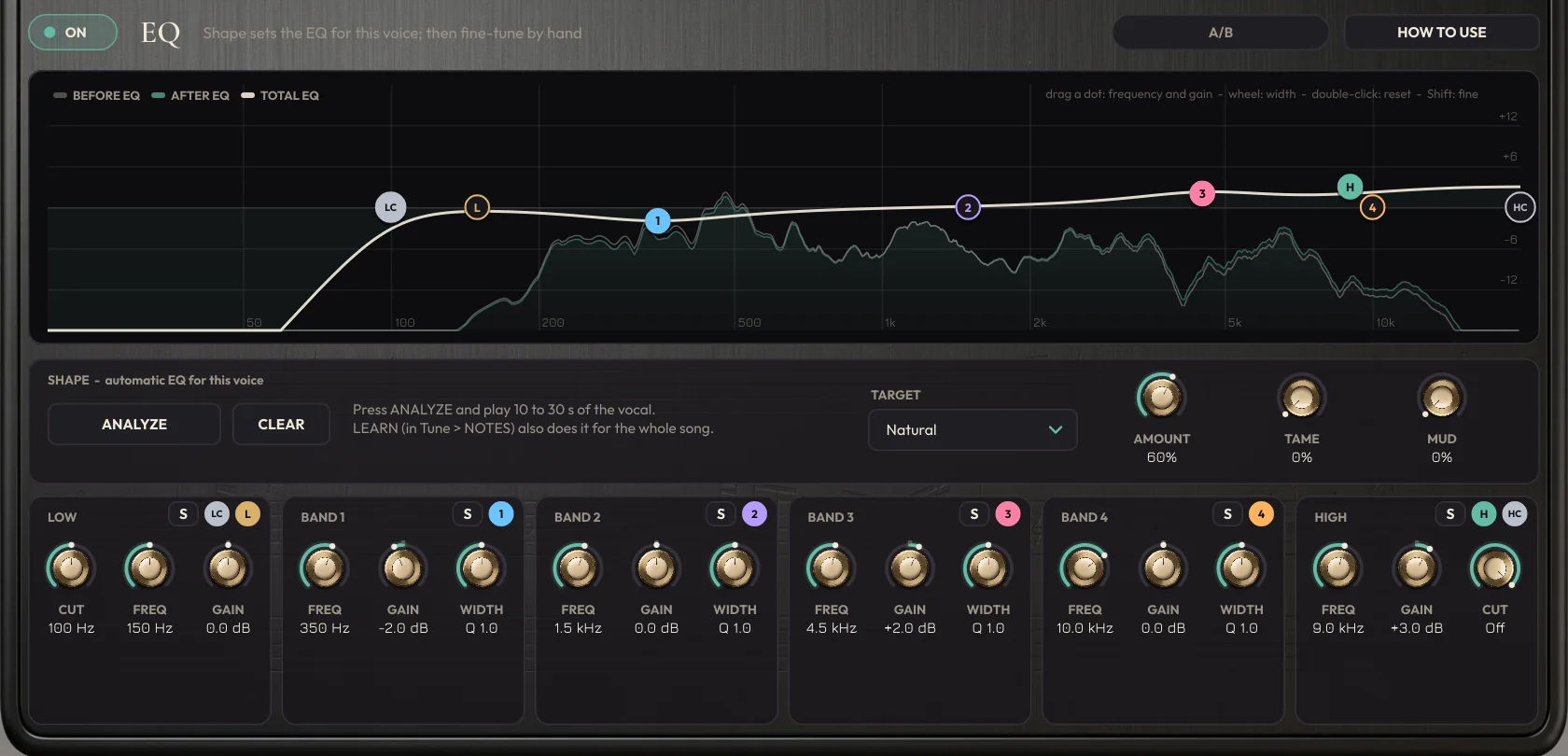
Dots
LC (low cut), L (low shelf), 1, 2, 3 and 4, H (high shelf) and HC (high cut). Drag to change frequency and gain, use the mouse wheel for width and double-click to reset.
ANALYZE
Listens to 10 to 30 seconds of voice and builds the Shape curve. LEARN also does it with the whole song.
TARGET and AMOUNT
The sound Shape aims for (Natural, Modern, Warm, Bright, Broadcast) and how much of the curve is applied.
TAME and MUD
TAME turns harshness down only when it jumps out; MUD does the same with boomy low-mids.
S (SOLO)
On each section, lets you hear only that band’s region. Great for finding the frequency that bothers you.
Lower controls
Six sections (LOW, BAND 1 to 4 and HIGH) with the same settings as the dots, as knobs, plus the low cut and the high cut (HIGH CUT, 24 dB per octave).
The other blocks, one by one
Gate, Leveler, De-esser and the effects each have their own page: the controls on top and, below them, a graph of what the block is doing while the music plays. The HOW TO USE button swaps the graph for tips.
Gate
THRESHOLD, CLOSE (how far the voice must fall before it closes, so word endings are not chopped), RANGE and, in BREATH mode, how much the breaths are turned down. The graph shows the voice and the open and close points.

Leveler
TARGET, RANGE and SPEED. The graph shows the voice being brought to the target and, below it, the gain the Leveler is applying.
De-esser
MODE (Narrow or Wide), FREQUENCY, AMOUNT, LISTEN and AUTO. Each red bar is an S being turned down; on the right, where the S lives in your voice's spectrum.
Compressor
STYLE, THRESHOLD, RATIO, ATTACK, RELEASE, MIX and OUTPUT. Input and output waveform, gain reduction in red and the curve, with a dot showing where your voice is right now.
Saturation
MODE, DRIVE, TONE, FREQ and MIX. The input-to-output curve, measured on the block itself, and the harmonics it creates: even (warmer) and odd (edgier).
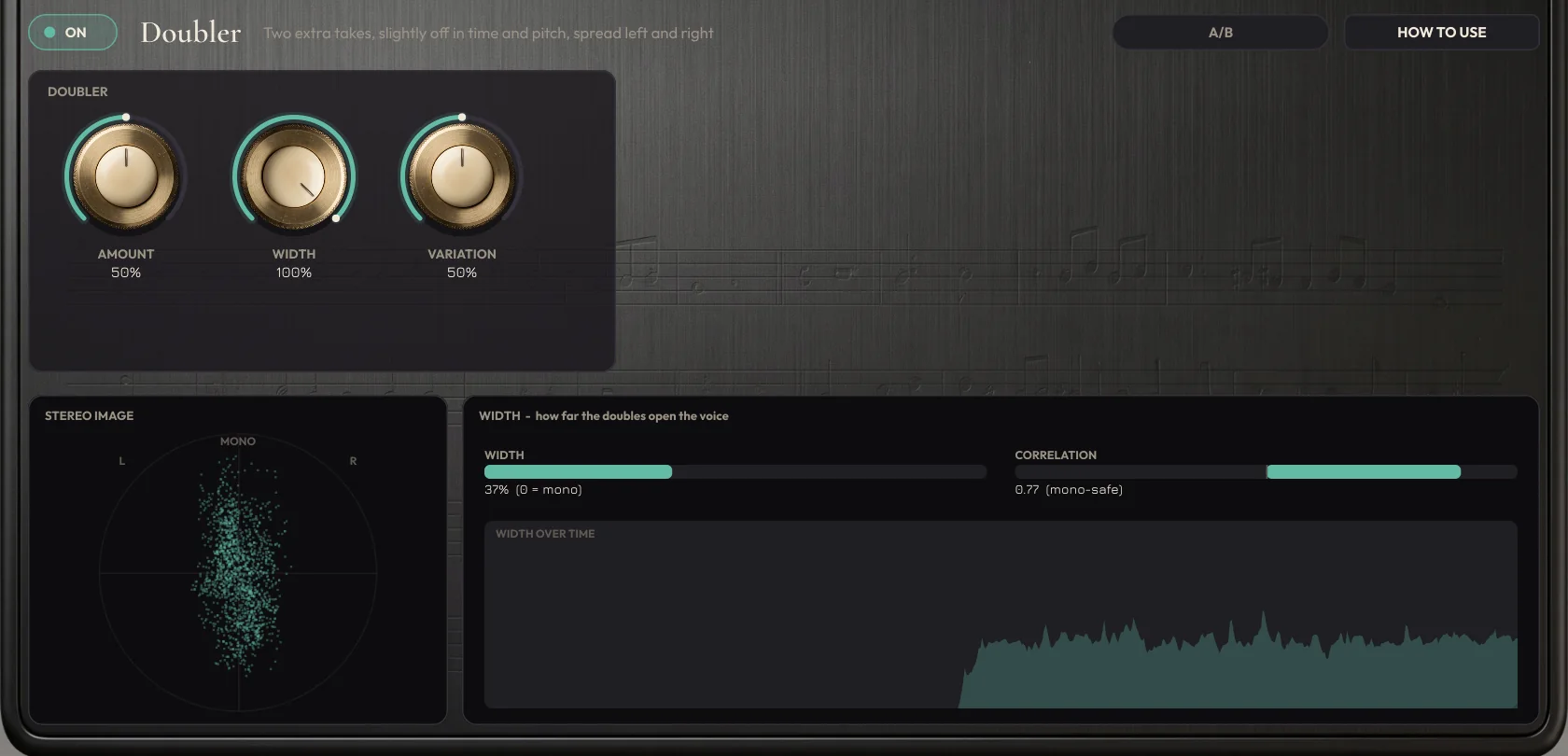
Doubler
AMOUNT, WIDTH and VARIATION. The stereo image, width and correlation, so you can check the voice stays safe in mono.
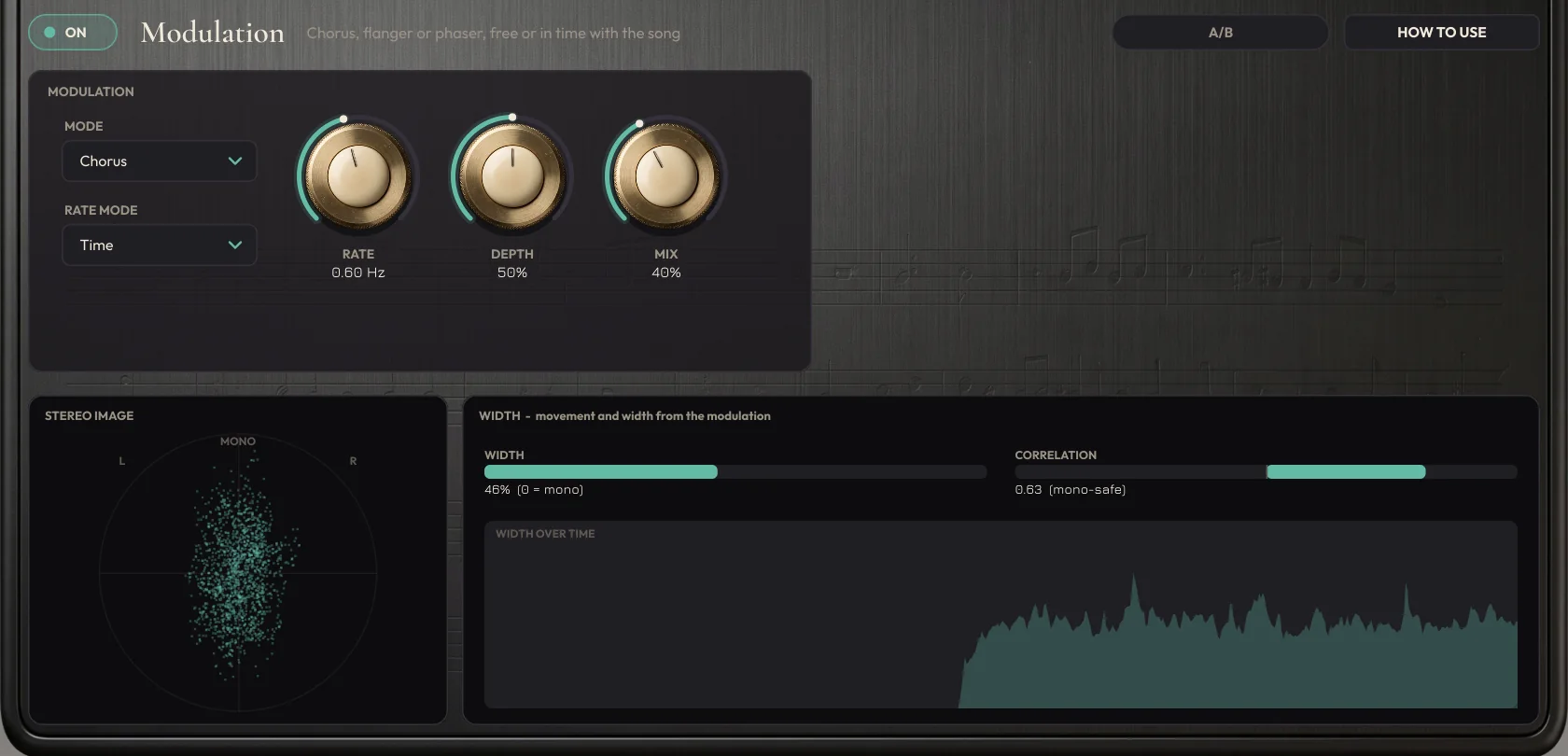
Modulation
MODE, RATE MODE (Hz or tempo), RATE, DEPTH and MIX, with the stereo image and the width over time.
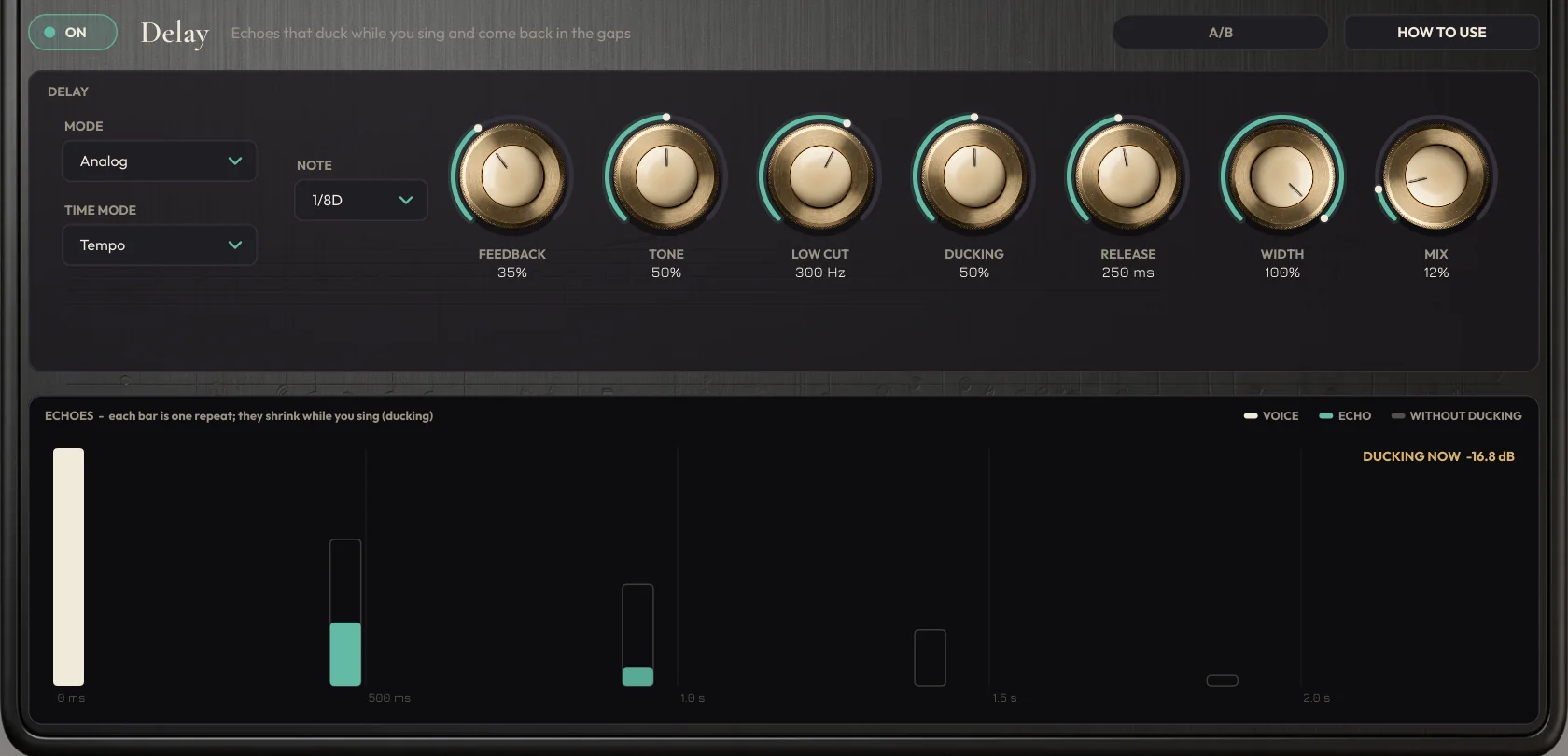
Delay
MODE, TIME MODE (milliseconds or note), FEEDBACK, TONE, LOW CUT, DUCKING, RELEASE, WIDTH and MIX. Each bar is one repeat, and they shrink live while you sing.
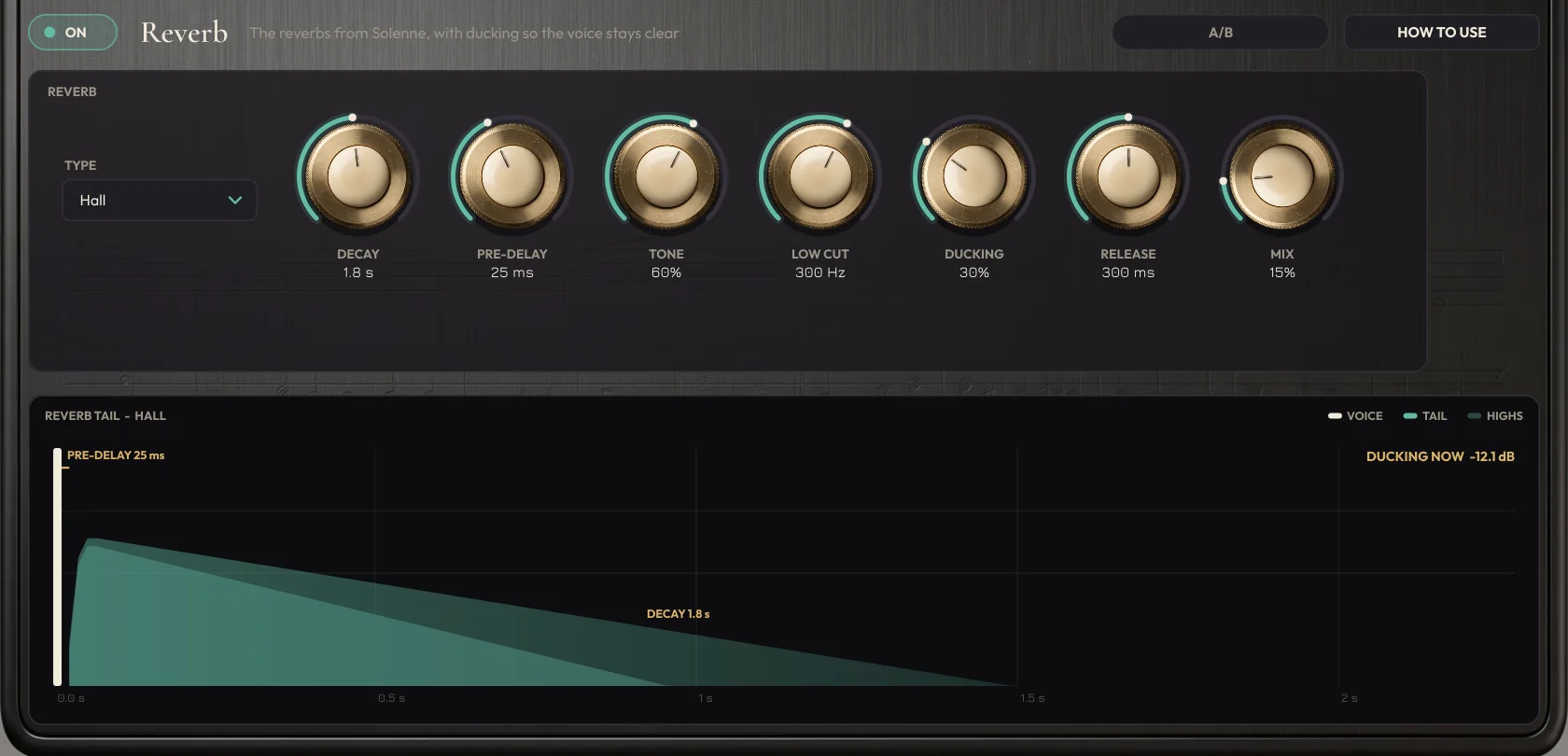
Reverb
TYPE, DECAY, PRE-DELAY, TONE, LOW CUT, DUCKING, RELEASE and MIX. The shape of the tail, with the pre-delay, the decay and the ducking right now.
A mix from start to finish
A working order that suits most vocals. The presets already do a lot of this; use it as a guide when you adjust.
Clean up
If there is hiss or hum, in the Gate CLEAN-UP section set HUM to Auto and NOISE to 30-50%. Gate with the threshold just above the noise between phrases; in BREATH mode, -6 to -12 dB on the breaths. On the De-esser, press AUTO and sing a phrase with S sounds.
Tune
Tune in Smart mode. Speed between 15 and 25 ms for pop, above 40 ms for a natural sound. High Humanize keeps the vibrato.
Shape the tone
On the EQ page, press ANALYZE in Shape, pick the target and then touch up with the dots. Use each band's S to find what bothers you. Tame and Mud at 30 to 60% control harshness and boominess.
Hold the dynamics
A gentle Leveler, then the compressor: Opto for a natural sound, Squash or Grit for modern pop. MIX below 100% gives parallel compression.
Open it up with harmonies
A third above (Voice 1) already changes a chorus. To widen it, turn on STEREO and pull the two singers apart on the stage.
Add space
Delay with ducking and a low cut between 200 and 400 Hz, and a Plate or Hall reverb with 20 to 60 ms of pre-delay, so the words stay up front.
Compare and finish
Use each block's A/B and the one at the top: because the level is matched, you hear the real difference. At the end, LIMIT on and an eye on the LUFS.
Getting the most out of it
Quick ideas that make a difference.
Gate before Tune
With the gate first in the chain, Tune gets a clean voice and doesn't try to tune the noise.
A clean guitar on the sidechain
Chord recognition works best with a clean guitar, without reverb or distortion. A DI or a mic both work.
Thirds and fifths
+3rd and +5th in Chord mode make the classic two-part harmony. For a choir, add an octave below (Fixed, -12) very quietly.
Voices that sound like people
10 to 25 ms of delay, Human around 50% and a slightly different formant on each voice make the harmonies sound like other singers.
An exact harmony line
Want a specific harmony line? Put the voice in MIDI mode and record the notes on a MIDI track routed to Madrigal.
TRACKING is for recording
Record with TRACKING on to hear the tuned voice with no delay. When mixing, turn it off: Tune goes back to the whole phrase and the harmonies come back.
SOLO to find the problem
Press the S on an EQ band and sweep the frequency until the bad sound jumps out. Then turn S off and cut right there.
Trust the A/B
Before deciding whether a change helped, use the A/B. It matches the level and shows the real difference.
80 presets to get started
Complete chains, ready to adjust. And you can save your own with SAVE.
Pop · 8
Rock & Metal · 8
Sertanejo & Country · 8
Gospel & Worship · 8
MPB & Acoustic · 8
Rap & Trap · 8
R&B & Soul · 7
Podcast & Voice · 7
Harmony · 9
Creative · 9
Try before you buy
Download the trial with everything unlocked: all twelve blocks, the four harmony voices, the 80 presets and the standalone app. The only difference is that the sound drops out for 3 seconds every 45 seconds and presets can’t be saved. Like it? Buy a license and paste the key into the plugin, no reinstall needed.
Windows 10 and 11 (VST3 and standalone) and macOS 10.15 or newer (AU, VST3 and standalone).
Specifications
System
Windows 10 or 11, 64-bit. macOS 10.15 or newer (Intel and Apple Silicon).
Formats
Windows: VST3 and standalone app. Mac: AU, VST3 and standalone.
Inputs
Voice (mono or stereo), guitar on the sidechain and MIDI for the harmonies. In the app: input 1 voice, input 2 guitar.
Blocks
12, in any order (Harmony always comes after Tune).
Harmonies
Up to 4 voices, each one mono or stereo, in Chord, Scale, Fixed and MIDI modes, with the notes exported as MIDI.
Tuning
Smart, Scale, Chord and Chromatic. A4 from 415 to 466 Hz.
Latency
Mixing: about 180 ms, reported to the DAW, which compensates automatically. TRACKING: zero, with Tune working live (3 to 12 ms).
Output and presets
Limiter with a -1 dB ceiling and a LUFS meter. 80 factory presets in 10 styles, plus your own.
FAQ
Can I sing live through it?
Yes, with TRACKING on. Latency drops to zero and Tune corrects live with a few milliseconds of delay, together with the effects. The harmonies are off in this mode, because they need to look a little ahead in the voice. To mix, turn TRACKING off: the DAW compensates for the roughly 180 ms automatically and everything lines up.
Do I need a guitar?
No. Without a guitar, the key comes from your voice and everything else works. The guitar brings the chords: with it, the harmonies follow each chord, not just the scale. You can also play the harmonies on a MIDI keyboard.
How do I use MIDI harmonies?
Put a voice in MIDI mode and route your keyboard or a MIDI track to Madrigal. The first MIDI voice sings the lowest note being held, the second the next one. With no note held, the voice is silent.
Does it work with electric guitar or keys on the sidechain?
It was tuned for clean acoustic and electric guitar. Other chord instruments may work, but they have been tested less.
Will the tuning change the note I meant to sing?
Smart mode was built to avoid exactly that: it keeps the note closest to what you sang, even outside the scale. If a note still comes out different from what you meant, the NOTES screen lets you change it or switch off correction for that note only.
What does LEARN store?
The analysis of the whole song (notes, chords and key) and your edits. It is saved with your DAW project and follows the timeline position, even if you press play in the middle of the song.
Can I use just part of it, like only the EQ or only the harmonies?
Yes. Every block switches on and off on its own.
Do the stereo harmonies work in mono?
They do. The two singers really are different in timing, pitch and tone, so they don’t cancel when summed to mono.
Is there a Mac version?
Yes: AU, VST3 and standalone app, for macOS 10.15 or newer (Intel and Apple Silicon).
Is there a demo?
Yes. Download the trial right here on this page. Without a license Madrigal runs as a demo: the sound drops out for 3 seconds every 45 seconds and presets can’t be saved. With your license key it plays without breaks, no reinstall needed.
Can I send the harmonies to a synth or a choir?
Yes. Press REC MIDI, play the song and press STOP: Madrigal records a MIDI file with the lead and every harmony voice on separate tracks. Drag the DRAG .MID button into your DAW.
Does it work for female singers?
Yes. Choose Female voice in the VOICE selector: pitch detection and the voice-dependent frequencies adapt, and every preset works for her.
Your voice up front, the choir around it.
Charged in Brazilian Reais (BRL), converted from US$ 49 at the day’s exchange rate. PayPal or your card converts it back and shows the exact amount in your currency before you confirm. Download link and license key by e-mail right after payment.