
DARTA DIGITAL AUDIO · OCTAVE FUZZ WITH LFO · FREE PLUGIN

The square-wave fuzz of a Darta Effects pedal, with a real octave down and an LFO that swaps one for the other at the speed you choose, or locked to your song's tempo. Old-school video game sound on your guitar. It's free: leave your e-mail and get the download link right away.
Windows 10 and 11 (VST3 and standalone) and macOS 10.15 or newer (AU, VST3 and standalone).
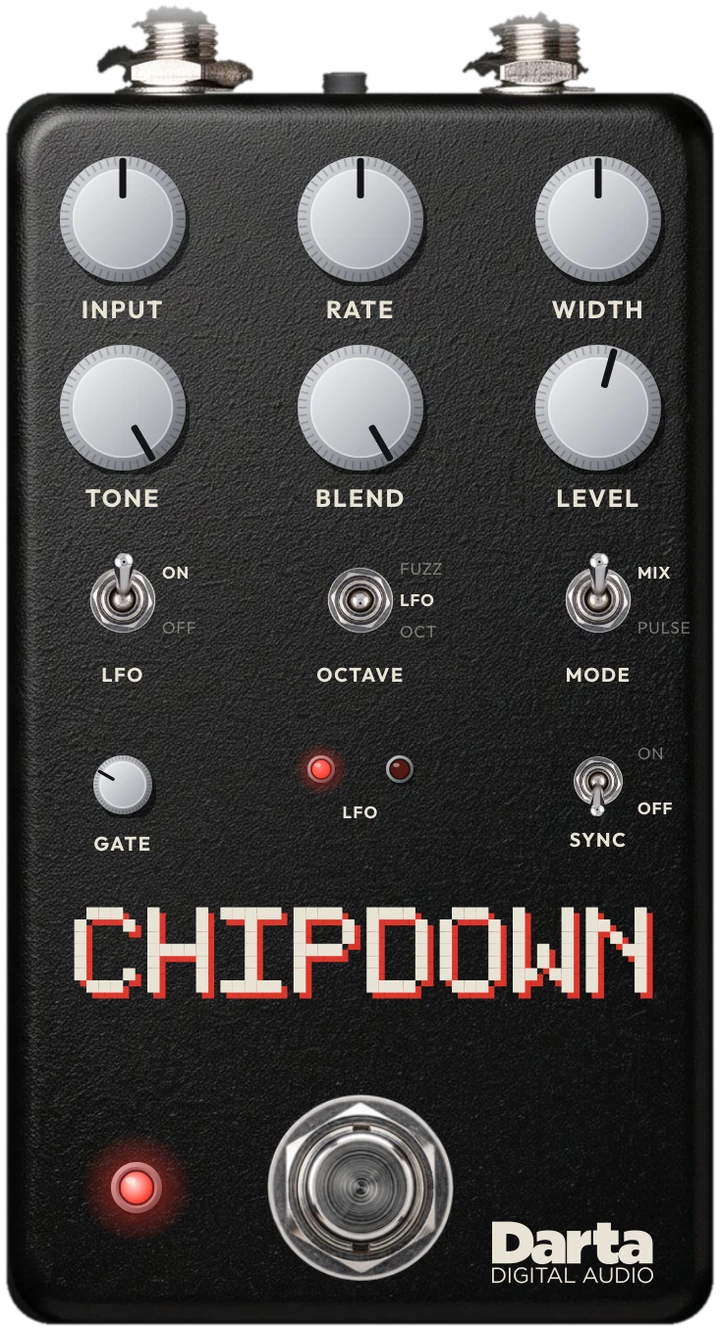
Eight bits, one octave down.
CHIPDOWN turns your guitar into a square wave, the same tone as old video games, and a transistor divider creates the octave down, like the bass line of an arcade soundtrack. An oscillator swaps the fuzz and the octave, and PULSE mode turns every note into a stream of short pulses. The plugin models the pedal's circuit part by part, with the schematic's values.
Square fuzz
A two-transistor trigger chops the signal into a square wave: on or off, nothing in between, like a video game chip.
A real octave
A transistor divider flips on every cycle of the wave: the octave down follows your note, with no digital pitch shifting.
A swapping LFO
A two-transistor oscillator swaps the fuzz and the octave. And it only runs while you play: its power comes from the guitar itself.
The controls
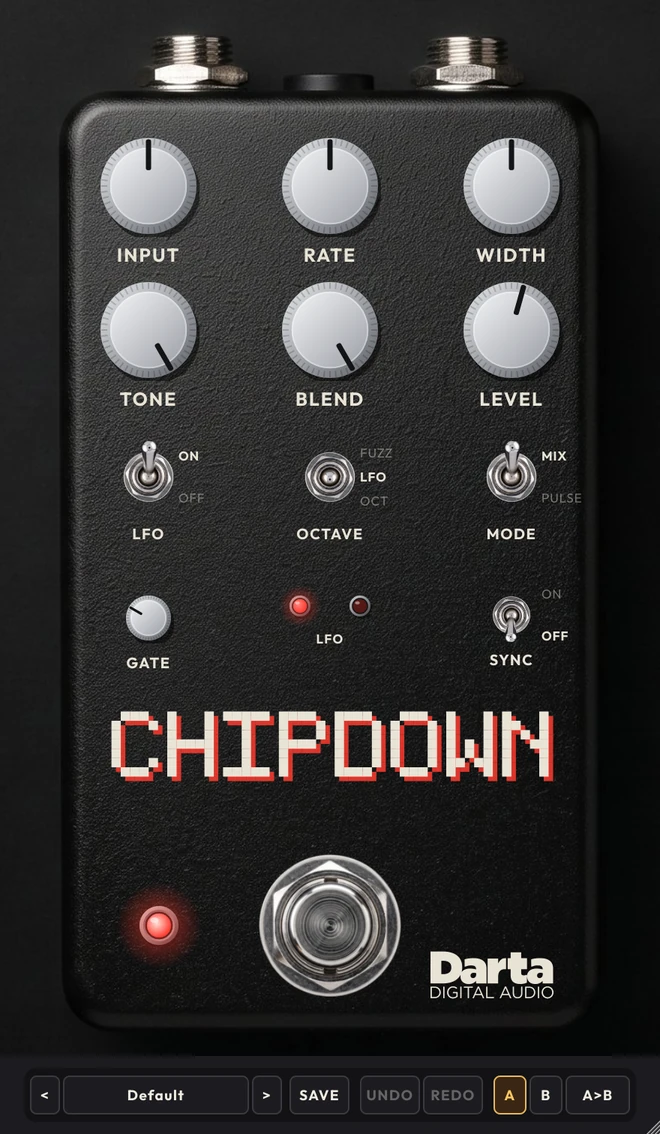
Seven knobs, four switches and one footswitch. All of them can be automated in your DAW.
INPUT
How much signal reaches the trigger. At 5 the fuzz is at its fullest; toward 0 or 10 it starts to sputter and cut the end of your notes, like a dying battery.
RATE
The LFO speed, from about 1.8 to 6.8 swaps per second. With SYNC on, it snaps to the nearest note value of the tempo.
WIDTH
The pulse width in PULSE mode. At 0 the pulse disappears; at 10 it is the widest.
TONE
A high cut after the pedal. At 10 it is wide open.
BLEND
Mixes the pedal with the clean guitar. At 10, only the pedal.
LEVEL
The volume. At 3 it matches the guitar with the pedal off; above that, up to +24 dB.
LFO
Switch. ON: the oscillator swaps the fuzz and the octave. OFF: the oscillator stops and the sound holds still.
OCTAVE
Three-way switch. FUZZ: the fuzz only (with the LFO on, it turns on and off in rhythm). LFO: the LFO swaps fuzz and octave; with the LFO off, both sound together. OCT: the octave only.
MODE
Switch. MIX: the fuzz and octave mix. PULSE: a fixed-width pulse on every edge of the wave, set with WIDTH.
SYNC
Small switch. ON: RATE follows your DAW’s tempo, from 1/1 to 1/32, with dotted and triplet values. The plugin measures the LFO and corrects it, so it stays in time.
GATE
Closes in the pauses. It listens to the clean guitar, before the pedal. At 0 it is off.
FOOTSWITCH
ON turns the pedal on with no click. The two small LEDs blink with the LFO, just like on the pedal.
Inside the circuit
The signal path, recreated with transistors, in the same order.
INPUT AND TRIGGER
A transistor amplifies the guitar and a two-transistor trigger turns the signal into a square wave.
Great forThe video game fuzz.DIVIDER
Two cross-coupled transistors flip on every cycle of the square wave: the frequency drops by half, one octave down.
Great forThe octave that follows your note.LFO AND OUTPUT
A charge pump powers a two-transistor oscillator that opens and closes the fuzz and octave switches. In PULSE mode, a last transistor fires a pulse on every edge.
Great forThe rhythmic swap and the pulse.The switches
They change the circuit, not just the volume. And flipping them while you play doesn't click.
LFO ON · OCTAVE LFO
The default: the LFO swaps the fuzz and the octave, like an arcade arpeggio. Try the Default and Fast Swap presets.
LFO OFF
The oscillator stops and the sound holds still. With OCTAVE on FUZZ, a steady square fuzz; on OCT, the octave only; in the middle, both together. Try Steady Fuzz, Octave Down and Fuzz + Octave.
MODE PULSE
Every edge of the wave becomes a short pulse, its width set with WIDTH: a thinner, more electronic sound. Try Pulse Swap and Thin Pulse.
16 presets to start with
In four categories. And you can save your own with SAVE, compare two settings with A and B, and undo with UNDO.
LFO · 4
Fuzz · 4
Octave · 4
Pulse · 4
Tips to get the most out of it
Ideas to get started.
Start at 5
INPUT at 5 gives the tightest fuzz. Then try the extremes, to make the fuzz sputter on purpose.
One note at a time
Like any analog octave fuzz, the octave tracks best one note at a time. Chords turn into 8-bit chaos, and that can be fun too.
Neck pickup
With less treble, the octave tracks more steadily. Try your guitar’s volume too.
Play and the LFO runs
The LFO’s power comes from your guitar: long, strong notes keep it spinning; in silence it stops, just like the pedal.
In time
Turn SYNC on and pick the note value with RATE: the swap locks to the song’s tempo.
More musical
BLEND at 6 mixes in the clean guitar and keeps the pitch clear. Try the Fuzz Blend preset.
Under the hood
Checked against circuit simulation
The circuit was compared with SPICE, the circuit simulator engineers use, in eight situations: the trigger, divider and LFO edges land at the same instants.
Real transistors and diodes
Nine transistors, six diodes and the LFO's two LEDs, each with its own model; the state changes are computed in much smaller steps inside each sample.
With the schematic's values
Every resistor and capacitor of the pedal, plus the guitar's pickup and cable at the input, which shape how the fuzz responds.
Clean highs
The circuit runs at 4x your DAW's rate and the output is averaged over each interval: the square wave comes out without the metallic hiss of aliasing.
Specifications
System
Windows 10 or 11, 64-bit. macOS 10.15 or newer (Intel and Apple Silicon).
Formats
Windows: VST3 and standalone application. Mac: AU, VST3 and standalone application.
Controls
Input, Rate, Width, Tone, Blend, Level, Gate, the LFO, Octave, Mode and Sync switches and the On footswitch.
Channels
Mono or stereo. A mono guitar comes out on both sides.
FAQ
Which gear is it based on?
On the circuit of a Darta Effects pedal, our pedal brand: a transistor octave fuzz with an LFO that swaps the fuzz and the octave. The plugin models that circuit.
Does the octave work with chords?
Like any analog octave fuzz, it tracks best one note at a time; with chords the divider gets lost and the sound turns into 8-bit noise, great for effects.
Why does the LFO stop when I stop playing?
Because on the pedal the oscillator is powered by the guitar signal itself, through a charge pump. The plugin does the same.
Is there latency?
Only 4 samples (under 0.1 ms at 48 kHz), because of the oversampling: imperceptible. The bypassed sound is delayed by the same amount, so switching on and off sounds seamless.
Is there a Mac version?
Yes, for macOS 10.15 or newer, on Intel and Apple Silicon Macs (AU, VST3 and standalone). The download e-mail has both the Windows and the Mac link.
Is it really free?
Yes. No license key, no card and no trial period. It's yours.
Why do you ask for my e-mail?
That's how we send you the download link and let you know about updates and Darta's next releases. Every e-mail has a one-click unsubscribe link.
I didn't get the e-mail.
Check your spam folder and the Promotions tab. If it hasn't arrived in 10 minutes, write to contato@dartadigitalaudio.com.br.
Can I play without a DAW?
Yes. The standalone app comes with a clean amp (VOLUME, BASS, MIDDLE and TREBLE) and a 1×12 cabinet, or your own IR. Just plug your guitar into your audio interface and play. In your DAW, the plugin is just the pedal, so you can use any amp and cabinet you like.
Get your Chipdown.
Leave your e-mail and the download link will be there in a moment.